10 Best Talkdesk Alternatives: TL;DR Comparison Table
| # | Tool | Best For | Starting Price (annual billing) | G2 Rating |
|---|---|---|---|---|
| 1 | CloudTalk | Scaling SMB and mid-market sales & support teams | $19/user/mo | 4.4/5 |
| 2 | JustCall | High-velocity outbound sales floors | $29/user/mo (2-user min) | 4.3/5 |
| 3 | Aircall | Fast deployment and CRM overlay integrations | $30/user/mo (3-user min) | 4.4/5 |
| 4 | Dialpad | AI-centric teams needing live agent coaching | $80/user/mo (Contact Center) | 4.4/5 |
| 5 | Quo (OpenPhone) | Collaborative shared inboxes for micro-teams | $15/user/mo | 4.7/5 |
| 6 | Five9 | Large enterprises needing predictive dialing at scale | $159/user/mo (50-seat min) | 4.1/5 |
| 7 | Zoom Contact Center | Teams already using Zoom Workplace | $69/user/mo | 4.3/5 |
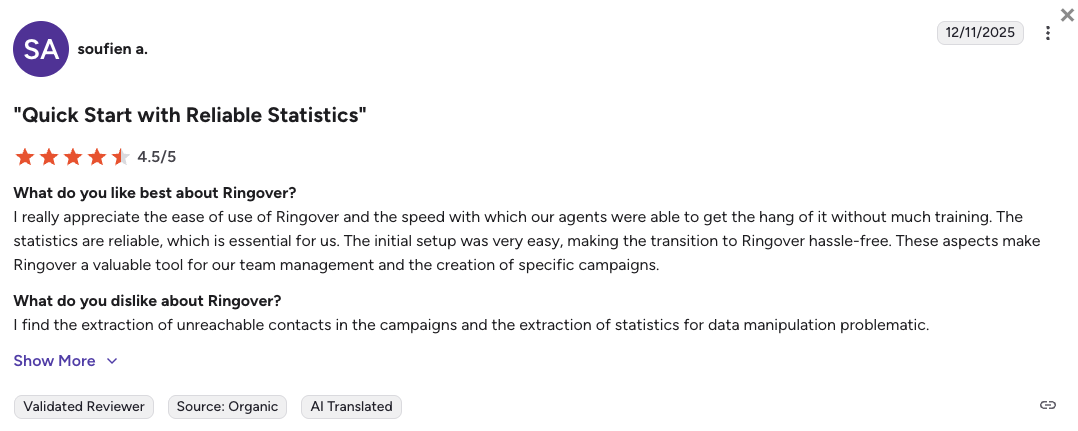
| 8 | Ringover | Predictable international calling and live coaching | $21/user/mo | 4.5/5 |
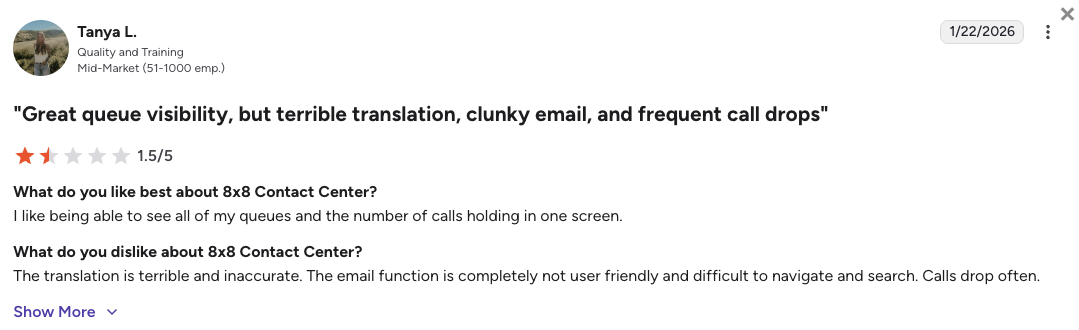
| 9 | 8×8 | Single-vendor UCaaS + CCaaS with built-in compliance | $85/user/mo (Voice CCaaS) | 4.1/5 |
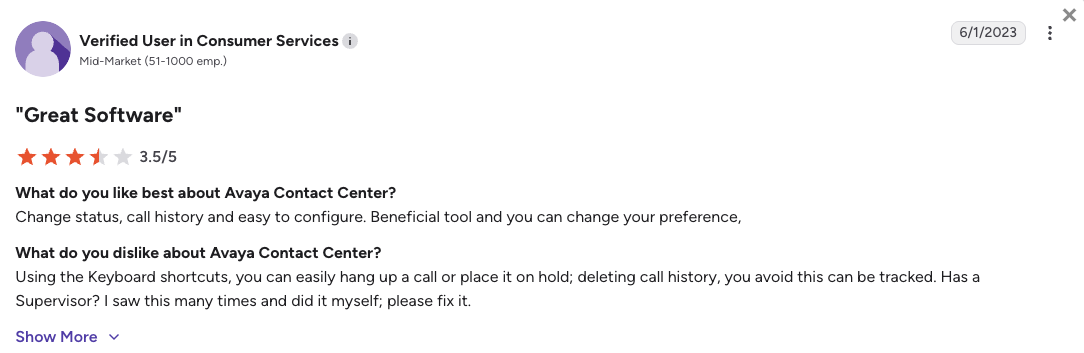
| 10 | Avaya | Legacy enterprises transitioning to cloud infrastructure | $48/user/mo (Digital) | 4.2/5 |
Skip the Reading. See It Live.
Why Teams Are Searching for a Talkdesk Alternative
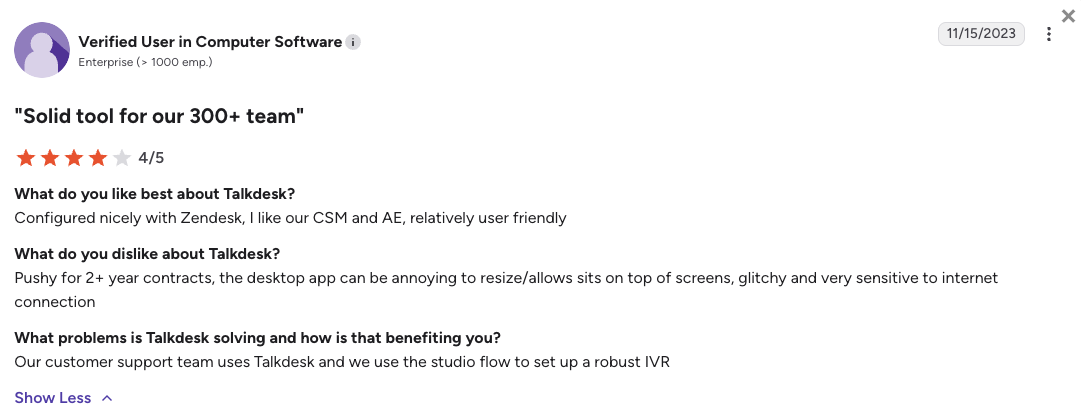
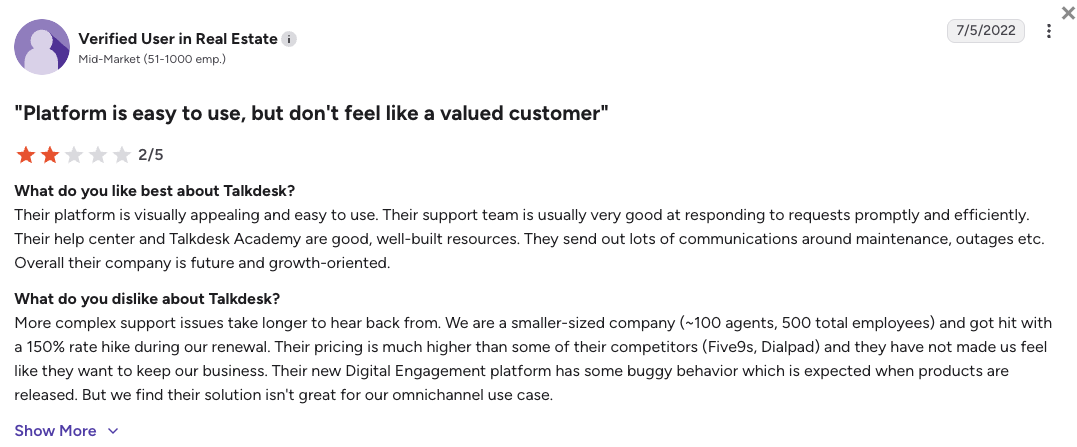
Teams start looking for Talkdesk alternatives the moment they realize what Talkdesk’s pricing, which starts at $85/user/month, actually includes. The entry plan handles basic inbound calls, but API access, call recording, and CRM sync all require upgrading to the $115 Elevate tier. For growing sales and support teams, that pricing architecture adds up fast.
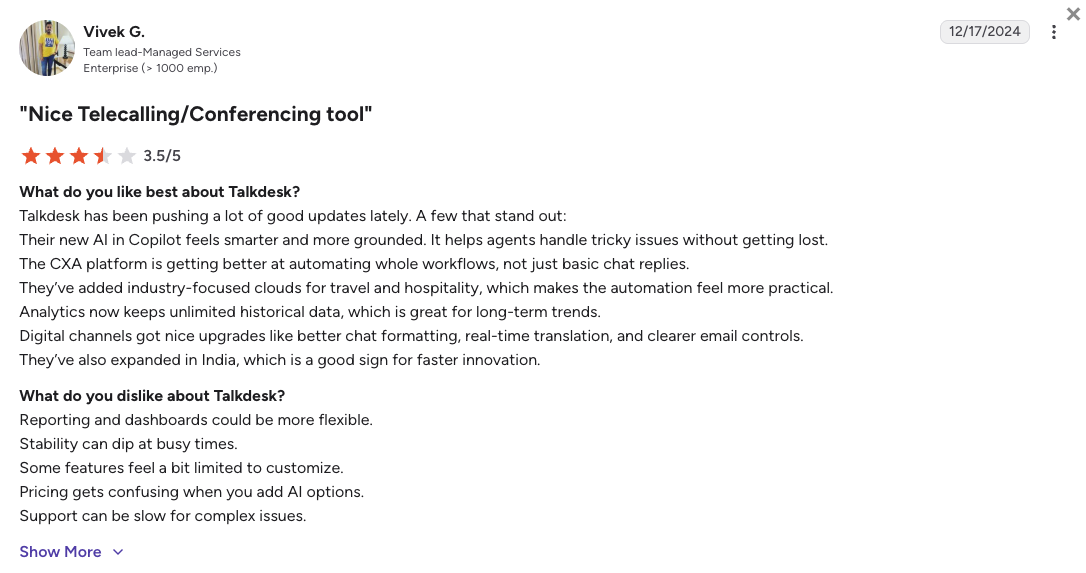
Based on verified reviews on G2 (where Talkdesk scores 4.4/5), Trustpilot (where Talkdesk scores a low 1.9/5), Reddit, and Quora, here are the five operational problems Talkdesk users consistently run into.
5 Main Cons of Talkdesk That Make Growing Teams Leave
-
The $115 enterprise paywallBasic features like call recording, API access, and advanced IVR routing are locked behind the $115 Elevate tier. AI tools and omnichannel digital channels require the $145–$165+ Elite tier. Your team ends up paying enterprise prices for features that competitors include in their base plans.
-
CRM integrations that drop the ballTalkdesk advertises deep Salesforce and HubSpot connections, but verified users on G2 and Reddit consistently report audio dropouts mid-call, blank agent screens, and failed Salesforce case creation. When your CRM sync fails during a live conversation, your reps fall back on manual data entry.
-
Support that makes you waitTrustpilot reviewers describe Talkdesk’s support as slow and heavily offshored. Getting a complex ticket resolved often requires paying for a dedicated Technical Account Manager. When your contact center goes down, waiting weeks for a resolution isn’t an option.
-
Inconsistent historical reportingMid-market teams on G2 report that Talkdesk’s historical reports occasionally return different figures for the same query at different times. If your workforce management relies on that data, inconsistent numbers create real operational risk.
-
A desktop app that fights your IT teamTalkdesk’s softphone installs inside the Windows AppData\Local directory, a path that triggers firewall alerts and UAC prompts on tightly managed devices. For IT teams responsible for a fleet of endpoints, routine security patching becomes a manual headache every update cycle.
What Is the Best Alternative to Talkdesk?
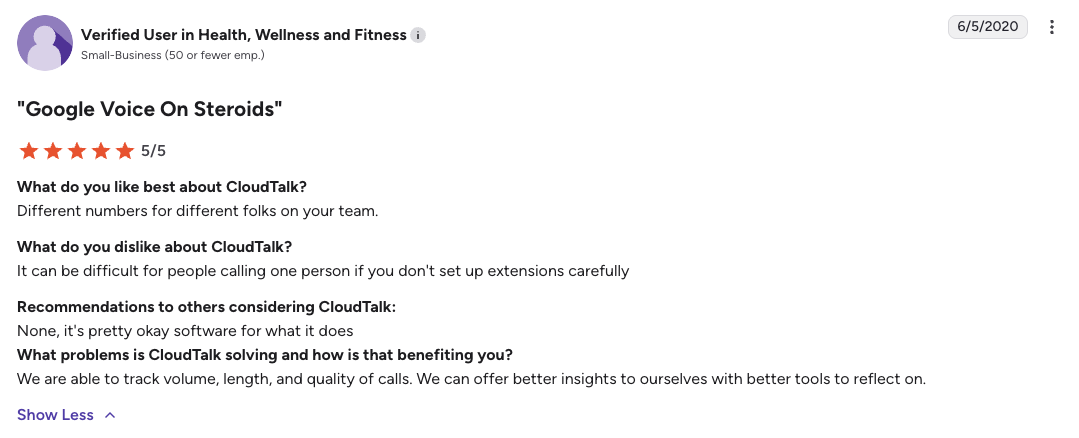
CloudTalk is the best alternative to Talkdesk for scaling SMB and mid-market sales and support teams. Starting at $19/user/month, CloudTalk solves Talkdesk’s three biggest operational problems: the enterprise pricing wall, brittle CRM integrations, and unresponsive support. And it does all that without adding enterprise-level IT complexity.
Why Do Teams Consider CloudTalk the Best Talkdesk Alternative?
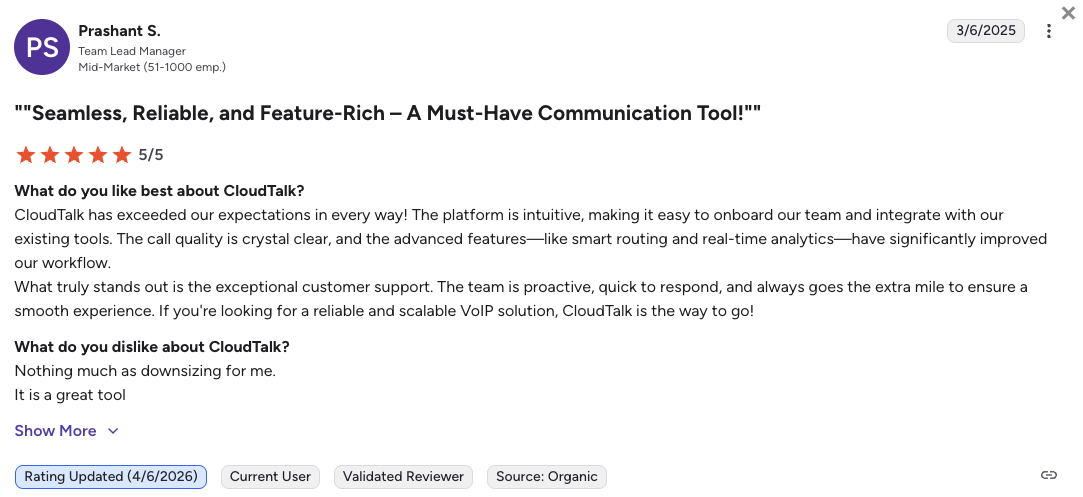
The main reason CloudTalk wins against Talkdesk is reliability at a fraction of the cost. CloudTalk’s CRM integrations sync call data, transcripts, and contact records directly into Salesforce, HubSpot, and 100+ other tools without audio drops or missed case creation. Your reps stay focused on customers instead of firefighting broken syncs.
5 Reasons CloudTalk Is the Best Talkdesk Alternative
-
No enterprise paywall for essential featuresCRM integrations, skill-based routing, real-time analytics, and workflow automation are available from the Essential plan ($29/user/mo). You don’t need a six-figure contract to run a professional contact center.
-
Rock-solid CRM sync without the firefightingCloudTalk connects natively to HubSpot, Zendesk, Pipedrive, and Salesforce (Expert plan). Every call, transcript, and contact update logs automatically. No blank screens, no missed case creation, no reps switching back to manual entry.
-
Transparent AI pricing your finance team can forecastConversation Intelligence is a flat-rate add-on at $9/mo. AI Voice Agents start from $349/mo and AI Receptionists from $99/mo.
-
Native smart dialers built for outbound sales floorsPower, Preview, and Smart Dialer are included on the Expert plan. The Parallel Dialer is available as a flat-rate add-on ($39/mo).
-
99.999% uptime with no desktop app installation headachesCloudTalk runs in the browser. No AppData\Local installation, no UAC prompts, no firewall exceptions required.
Stop Paying $115 for Features Talkdesk Should Include by Default
How We Tested and Rated Talkdesk Alternatives 2026
To build this list, we reviewed pricing pages, technical documentation, and hundreds of unfiltered user reviews across G2, Trustpilot, Reddit, and Quora. Our focus was on the scaling SMB and mid-market segment: teams of 10 to 200 agents that need contact center power without enterprise IT complexity.
We evaluated every platform against six criteria that matter most to growing teams switching away from Talkdesk.
-
Pricing transparencyWe compared the true cost of ownership, including add-on fees, seat minimums, and what’s actually included at each tier, not just the headline starting price.
-
CRM integration stabilityWe looked specifically at Salesforce, HubSpot, and Zendesk sync reliability, not just whether an integration exists, but whether it works without dropping calls or missing data.
-
AI capabilities and cost modelWe evaluated how AI is priced: bundled natively, gated behind enterprise tiers, or metered per minute. Flat-rate models score higher for growing teams trying to forecast costs.
-
Outbound dialingWe checked for native Power, Smart, and Parallel Dialers, and confirmed which pricing tier each is available on.
-
Global coverageWe prioritized platforms with virtual numbers in multiple countries, especially for teams operating across regions or making high volumes of international outbound calls.
-
Support qualityWe verified support tiers, live vs. automated, domestic vs. offshored, and cross-referenced user-reported resolution times for complex technical issues.
The Top 10 Talkdesk Alternatives: Feature Comparison
Here’s how all 10 platforms stack up across the features that matter most when switching from Talkdesk.
Talkdesk Competitors: Feature Comparison Matrix
| Feature | Talkdesk | CloudTalk | JustCall | Aircall | Dialpad |
|---|---|---|---|---|---|
| Starting Price (annual) | $85/user/mo | $19/user/mo | $29/user/mo (2-seat min) | $30/user/mo (3-seat min) | $80/user/mo (Contact Center) |
| Free Trial | No | 14 days | 14 days | 7 days | 14 days |
| Minimum Agents | 1 user | 1 user | 2 users | 3 users | 1 user |
| CRM Integrations | Yes (brittle Salesforce sync reported on G2) | 100+ native (deep-sync from Essential) | 100+ native | 250+ marketplace integrations | Salesforce, HubSpot, Zendesk |
| AI Transcription | Elite tier only ($145+/user) | Flat-rate add-on ($9/mo) | Bundled from Team tier ($29) | Add-on ($9/user/mo) | Bundled natively from base plan |
| Outbound Dialers | Basic (advanced dialing limited on lower tiers) | Power, Smart, Parallel (Expert plan/add-on) | Power Dialer (Pro+ tier) | Power Dialer (Professional tier) | Basic outbound (Sell product required for full dialing) |
| AI Voice Agents | Elite tier required | Flexible bundles from $99/mo | Pro Plus tier ($89/user/mo) | Per-minute billing ($0.19–$0.49/min) | Custom quote only |
| Global Numbers | Limited regional coverage | 160+ countries | 70+ countries | 100+ countries | 70+ countries |
Why Talkdesk's $85 Entry Price Is Misleading
The $85 CX Cloud Essentials plan covers basic inbound calls. Call recording, API access, and CRM integrations all require the $115 Elevate tier. AI features, including transcription, Copilot, and Autopilot, require the $145–$165+ Elite tier. When you add up what a real contact center actually needs, Talkdesk’s true cost of ownership is closer to $145–$165/user/month for most growing teams.
1. CloudTalk: Best Talkdesk Alternative for Scaling SMB and Mid-Market Teams
What Is CloudTalk?
CloudTalk is an AI-powered cloud contact center built for SMB and mid-market sales and support teams. It sits squarely between basic VoIP tools and monolithic enterprise platforms, giving growing teams a full contact center feature set without the six-figure contract or the IT overhead.
Unlike Talkdesk, which gates essential features behind a $115+ paywall, CloudTalk starts at $19/user/month with basic call center features like call recording, call queues, and visual call flow builder already included. CloudTalk is currently trusted by 4,000+ growing businesses across more than 160 countries.
Why Is CloudTalk a Strong Talkdesk Alternative?
-
No enterprise paywall for essential featuresCRM integrations, skill-based routing, real-time analytics, and workflow automation are available from the Essential plan ($29/user/mo). You don’t need a six-figure contract to run a professional contact center.
-
Rock-solid CRM sync without the firefightingCloudTalk connects natively to HubSpot, Zendesk, Pipedrive, and Salesforce (Expert plan). Every call, transcript, and contact update logs automatically. No blank screens, no missed case creation, no reps switching back to manual entry.
-
Transparent AI pricing your finance team can forecastConversation Intelligence is a flat-rate add-on at $9/mo. AI Voice Agents start from $349/mo and AI Receptionists from $99/mo.
-
Native smart dialers built for outbound sales floorsPower, Preview, and Smart Dialer are included on the Expert plan. The Parallel Dialer is available as a flat-rate add-on ($39/mo).
-
99.999% uptime with no desktop app installation headachesCloudTalk runs in the browser. No AppData\Local installation, no UAC prompts, no firewall exceptions required.
What Are the Pros & Cons of CloudTalk?
| Pros | Cons |
|---|---|
| 160+ countries for global virtual numbers | No native video meetings, you’ll need a separate tool |
| 100+ stable CRM integrations (Salesforce from Expert) | Salesforce deep-sync requires the Expert plan ($49/user/mo) |
| Flat-rate AI pricing, no per-minute billing | Parallel Dialer is a paid add-on ($39/mo extra) |
| Power, Smart, and Parallel Dialers for outbound teams | |
| 24/7 live support (phone support on Expert) |
What Are CloudTalk’s Plans & Pricing?
CloudTalk pricing starts at $19/user/month (billed annually), with the following plans:
CloudTalk Pricing Plans
| Plan | Price (annual billing) | Key Features |
|---|---|---|
| Lite | $19/user/mo | Unlimited inbound calls, IVR, call recording, analytics |
| Starter | $25/user/mo | Everything in Lite + SMS, voicemail, call queues |
| Essential | $29/user/mo | Everything in Starter + 100+ CRM integrations, skill-based routing, workflow automation |
| Expert | $49/user/mo | Everything in Essential + Salesforce deep-sync, Power/Smart Dialers, phone support |
| Custom | Quote-based | Enterprise SLAs, dedicated account management, custom integrations |
AI Add-On Pricing at a Glance
AI add-ons: Conversation Intelligence $9/mo flat rate. AI Receptionist from $99/mo. AI Voice Agents from $349/mo. Power Dialer included on Expert. Parallel Dialer $39/mo add-on. Salesforce integration: Expert plan only.
What Are CloudTalk’s Customers Saying?
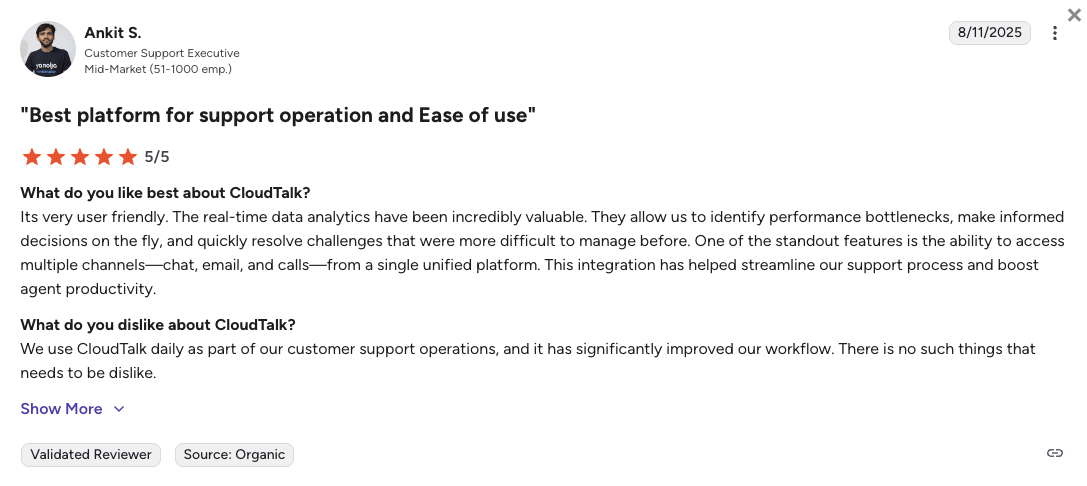
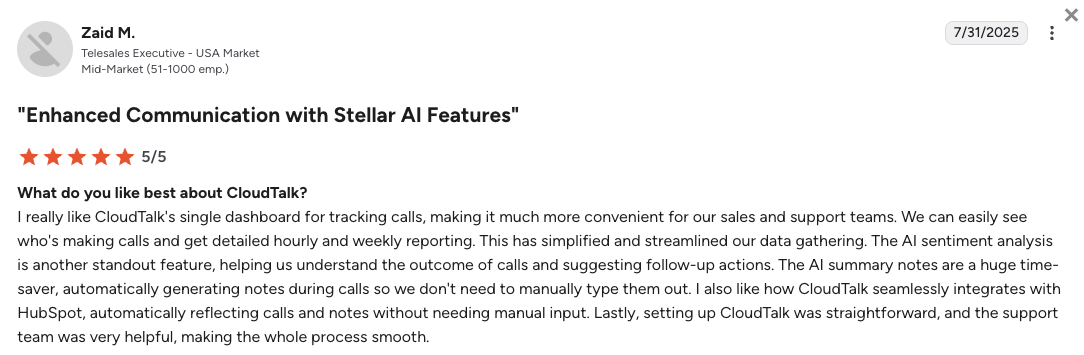
CloudTalk users consistently highlight three advantages over Talkdesk: reliable CRM sync that doesn’t drop data mid-call, a support team that responds quickly with real answers, and AI pricing they can actually forecast. The most common frustration is that the Salesforce integration is gated behind the Expert plan.
How Do G2 Users Rate CloudTalk?
CloudTalk’s current G2 rating is 4.4/5, out of 1,800+ verified user reviews.
See Why 4,000+ Teams Chose CloudTalk over Talkdesk
2. JustCall: Best for High-Velocity Outbound Sales Teams
What Is JustCall?
JustCall is a cloud phone system built specifically for outbound sales floors. It focuses on automating the dialing process and bundling AI transcription into its core plans, something Talkdesk reserves for its $145+ Elite tier.
Why Is JustCall a Strong Talkdesk Competitor?
-
AI transcription bundled from the base planJustCall includes AI transcription and call summaries in its $29 Team plan. Talkdesk locks similar features behind the $145+ Elite tier. For a sales team tracking every prospect conversation, that’s a significant cost advantage from day one.
-
CRM-first architecture that logs everything automaticallyWith 100+ native integrations, JustCall automatically logs every call, text, and voicemail into HubSpot, Pipedrive, Salesforce, or whichever CRM your team uses. No manual entry, no missed follow-ups.
-
High-speed outbound dialing for sales floorsJustCall’s Power Dialer and multi-touch SMS sequences keep reps moving through lead lists without switching between tabs. Available from the Pro tier.
What Are the Pros & Cons of JustCall?
| Pros | Cons |
|---|---|
| AI transcription bundled from $29/user Team plan | 2-user minimum, solo reps pay for 2 seats from day one |
| 100+ native CRM integrations with automatic call logging | SMS segment caps on lower tiers can limit high-volume campaigns |
| Power Dialer and multi-touch SMS sequences for outbound | AI Voice Agents locked behind the $89/user Pro Plus tier |
What Are JustCall’s Plans & Pricing?
JustCall pricing starts at $29/user/month (billed annually), with the following plans:
JustCall Pricing Plans
| Plan | Price (annual billing) | Key Features |
|---|---|---|
| Team | $29/user/mo | AI transcription, 100+ integrations, call recording, SMS |
| Pro | $49/user/mo | Everything in Team + Power Dialer, bulk SMS, advanced analytics |
| Pro Plus | $89/user/mo | Everything in Pro + AI Voice Agents, advanced coaching tools |
| Business | Custom quote | Enterprise SLAs, dedicated support, custom integrations |
Keep the 2-User Minimum in Mind
Team, Pro, and Pro Plus require a 2-user minimum. If you’re a solo rep, you’re paying for 2 seats from day one ($58/mo on the base plan). The Business plan steps this up to a 10-user minimum. Factor both into your total cost comparison.
What Are JustCall’s Customers Saying?
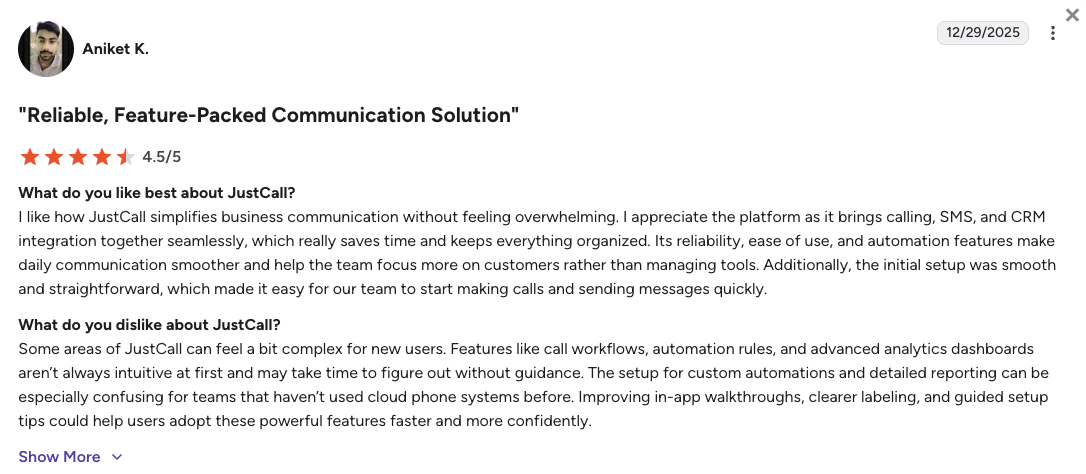
JustCall users consistently praise the dialing speed and CRM logging reliability. The most common frustration is the 2-user minimum catching solo reps off guard, and occasional interface glitches during high-volume dialing sessions.
How Do G2 Users Rate JustCall?
JustCall’s current G2 rating is 4.3/5, out of 2,300+ verified user reviews.
3. Aircall: Best for Fast Deployment and App Ecosystem Integrations
What Is Aircall?
Aircall is a cloud voice platform built around simplicity and connectivity. Instead of replacing your CRM, it plugs directly into it, making it a popular choice for IT teams that want to be live in hours, not weeks.
Why Is Aircall a Strong Alternative to Talkdesk?
-
Setup in hours, not weeksAircall’s onboarding takes a fraction of the time a Talkdesk deployment typically requires. Most teams have numbers provisioned, routing configured, and CRM connections live in under a day, without IT tickets or professional services hours.
-
250+ marketplace integrations, zero custom codeWhether your team runs on Zendesk, Salesforce, HubSpot, or Intercom, Aircall connects without developer involvement, directly solving the data silo problems Talkdesk users regularly report.
-
Intuitive interface with a short learning curveNew agents pick up Aircall fast. The mobile and desktop apps are consistently rated among the most user-friendly in CCaaS (Contact Center as a Service).
What Are the Pros & Cons of Aircall?
| Pros | Cons |
|---|---|
| Fastest deployment in the CCaaS space, live in under a day | 3-user minimum means a $90/mo baseline regardless of team size |
| 250+ marketplace integrations, no developer needed | Power Dialer locked behind the $50/user Professional tier |
| Clean, intuitive interface, minimal agent training required | AI Voice Agents billed per minute ($0.19–$0.49/min), costs unpredictable at volume |
What Are Aircall’s Plans & Pricing?
Aircall pricing starts at $30/user/month (billed annually, 3-user minimum applies), with the following plans:
Aircall Pricing Plans
| Plan | Price (annual billing) | Key Features |
|---|---|---|
| Essentials | $30/user/mo (3-user min) | 100+ integrations, call recording, IVR, analytics |
| Professional | $50/user/mo | Everything in Essentials + Power Dialer, Salesforce CTI, advanced analytics |
| Custom | Quote-based (25-user min) | Enterprise SLAs, dedicated onboarding, custom integrations |
The 3-User Minimum Changes the Math
Aircall’s 3-user minimum means you’re committing to at least $90/mo from day one. If you have fewer than 3 agents, CloudTalk’s 1-user minimum gives you more flexibility to start lean and scale without overpaying for empty seats.
What Are Customers Saying?
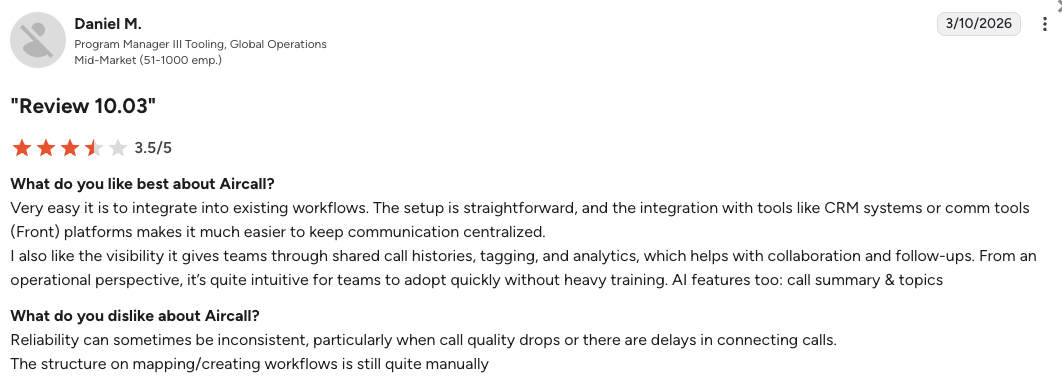
Aircall users consistently praise the speed of setup and the breadth of integrations. The most common frustrations are the 3-user minimum, occasional call quality issues during peak hours, and the per-minute billing model for AI features.
How Do G2 Users Rate Aircall?
Aircall’s current G2 rating is 4.4/5, out of 1,500+ verified user reviews.
4. Dialpad: Best for AI-Centric Teams Needing Live Agent Coaching
What Is Dialpad?
Dialpad is a UCaaS (Unified Communications as a Service) platform that built its reputation on native AI. It separates its internal business phone product (Connect) from its contact center products (Support and Sell). This gives teams flexibility, but adds product complexity and can push total costs higher than the headline prices suggest.
Why Is Dialpad a Strong Talkdesk Alternative?
-
Live AI coaching beats Talkdesk’s gated CopilotDialpad’s AI surfaces real-time scripts, objection handlers, and knowledge base articles on the agent’s screen during a live call. Talkdesk offers similar features only at the $145+ Elite tier.
-
AI transcription included from the base planDialpad’s AI transcription and live call summaries are built into its core plans, not sold as a $145+ upgrade.
-
One platform for internal and external communicationsDialpad unifies your internal business phone and external contact center in the same app, removing the need for a separate UCaaS tool running alongside Talkdesk.
What Are the Pros & Cons of Dialpad?
| Pros | Cons |
|---|---|
| Real-time AI coaching included at the contact center level | Contact center licenses start at $80/user, not dramatically cheaper than Talkdesk’s $85 |
| Bundled AI transcription from day one, no add-on required | Running a full team needs both Connect + Support licenses, pushing total cost higher |
| Unified UCaaS and CCaaS reduces vendor complexity | AI Voice Agents require a separate custom quote, no self-serve pricing |
What Are Dialpad’s Plans & Pricing?
Dialpad contact center pricing starts at $80/user/month (billed annually), with the following plans:
Dialpad Pricing Plans
| Plan | Price (annual billing) | Key Features |
|---|---|---|
| Connect Standard | $15/user/mo | Internal calls + AI transcription (business phone only) |
| Support Essentials | $80/user/mo | Inbound contact center + AI coaching + IVR routing |
| Support Advanced | $115/user/mo | Everything in Essentials + workforce management, advanced reporting |
| Sell Essentials | $39/user/mo | Outbound sales dialing + AI summaries + CRM sync |
Dialpad's $15 Price Tag Is for Internal Calls Only
Dialpad’s widely advertised $15/user Connect Standard plan covers internal business calls. Not contact center functionality. Running a real inbound or blended contact center requires the Support Essentials plan at $80/user/mo. Combining both licenses for a mixed team pushes per-seat costs into Talkdesk territory.
What Are Customers Saying?
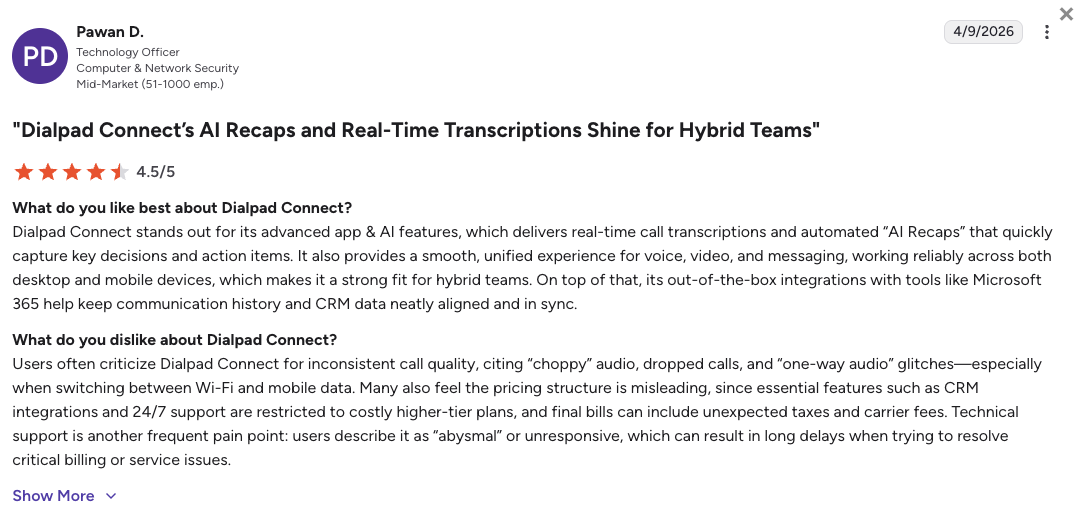
Dialpad users consistently praise the accuracy of AI transcription and the seamless app experience. The most common frustration is pricing fragmentation, teams that need both internal and external calling end up managing multiple licenses.
How Do G2 Users Rate Dialpad?
Dialpad’s current G2 rating is 4.4/5, out of 4,000+ verified user reviews.
5. Quo (OpenPhone): Best for Collaborative Shared Inboxes and Micro-Teams
What Is Quo?
Quo, formerly known as OpenPhone, is a modern business phone platform built around shared inboxes rather than traditional call queues. It’s designed for small, collaborative teams that want every teammate to see and respond to customer conversations from the same number.
Why Is Quo a Strong Talkdesk Competitor?
-
Shared inbox for whole-team collaboration at a fraction of Talkdesk’s priceMultiple teammates can call and text from the same business number. Talkdesk charges $85+/user for siloed agent seats. Quo does this for $15/user.
-
Built-in AI receptionist that answers for youQuo’s ‘Sona’ AI can answer after-hours calls, parse caller intent, route to the right person, and book appointments, without the enterprise price tag.
-
Full conversation history in one shared viewEvery call, voicemail, and text from a customer shows up in a single thread that your whole team can see. Handoffs between teammates become frictionless.
What Are the Pros & Cons of Quo (OpenPhone)?
| Pros | Cons |
|---|---|
| Shared inbox for team collaboration at $15/user | Not built for large contact centers, no complex queue routing or WFM |
| Built-in ‘Sona’ AI receptionist for after-hours coverage | Limited global calling outside North America |
| Full customer conversation history in one shared thread | Outgrows quickly beyond 20–30 agents as routing complexity increases |
What Are Quo (OpenPhone)’s Plans & Pricing?
Quo pricing starts at $15/user/month (billed annually), with the following plans:
Quo (OpenPhone) Pricing Plans
| Plan | Price (annual billing) | Key Features |
|---|---|---|
| Starter | $15/user/mo | Shared inboxes, calling, SMS, voicemail transcription |
| Business | $23/user/mo | Everything in Starter + Sona AI receptionist, HubSpot and Salesforce integrations, analytics |
| Scale | $35/user/mo | Everything in Business + priority support, advanced reporting, SSO |
Quo Works Best for Teams Under 25 Agents
Quo is an excellent fit for small, collaborative teams. As your contact center grows past 20–30 agents, you’ll quickly hit the ceiling on routing complexity, reporting depth, and outbound dialing capabilities. That’s when a platform like CloudTalk becomes the more practical long-term investment. That’s when a platform like CloudTalk becomes the more practical long-term investment.
What Are Customers Saying?
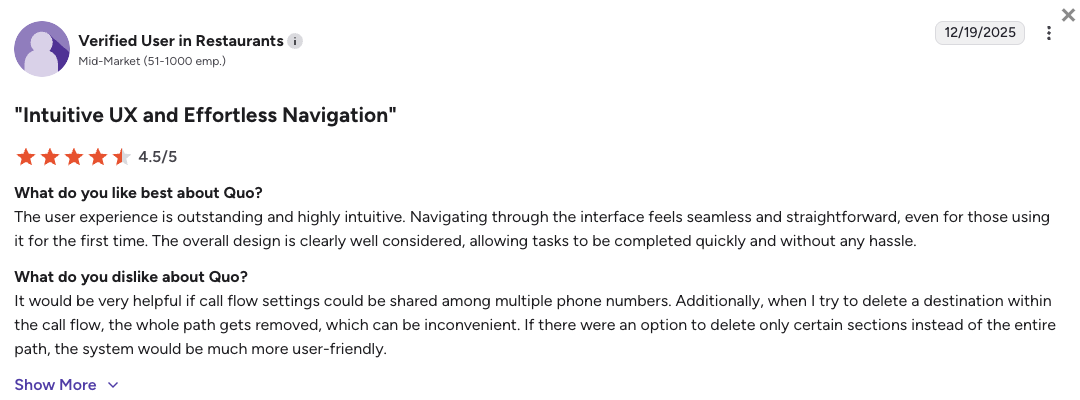
Quo users consistently praise the app design, the shared inbox concept, and the AI receptionist for small-team coverage. The main frustration is account stability for high-volume texting users, a portion of reviewers report account holds on high SMS volume campaigns.
How Do G2 Users Rate Quo (OpenPhone)?
Quo (OpenPhone)’s current G2 rating is 4.7/5, out of 3,300+ verified user reviews.
6. Five9: Best for Large Enterprises That Have Outgrown Talkdesk
What Is Five9?
Five9 is the heavyweight enterprise alternative to Talkdesk, a full-scale cloud contact center built for operations with 50 or more agents. If Talkdesk’s $145+ Elite tier feels expensive, Five9 is in a different pricing league entirely.
Why Is Five9 a Strong Alternative to Talkdesk?
-
Unmatched predictive dialing for large outbound operationsFive9’s dialing algorithms handle complex campaign pacing, answering machine detection, and compliance-aware pacing rules at a scale Talkdesk can’t match.
-
Native workforce management bundled inFive9 bundles WFM directly into its plans, forecasting, scheduling, and adherence monitoring without a separate third-party add-on. Talkdesk gates WFM behind premium add-ons even at the Elite tier.
-
Deep enterprise CRM connectionsFive9 connects at a deeper API level with enterprise CRMs and ERPs than Talkdesk manages at comparable tiers, especially Salesforce Service Cloud, Microsoft Dynamics, and ServiceNow.
What Are the Pros & Cons of Five9?
| Pros | Cons |
|---|---|
| Best-in-class predictive dialing for large outbound teams | 50-seat minimum, commits you to $8,000+/mo before a single call |
| Native WFM bundled without separate add-on fees | Legacy Java-based admin interface creates a steep learning curve for new admins |
| Deep enterprise CRM integrations (Salesforce, Dynamics, ServiceNow) | Heavily offshored Tier 1 support, complex issues typically require a paid TAM |
What Are Five9’s Plans & Pricing?
Five9 pricing starts at $119/user/month for digital channels only (no voice). Voice capabilities start at $159/user/month on the Core plan. A 50-seat minimum applies to all plans.
Five9 Pricing Plans
| Plan | Price (annual billing) | Key Features |
|---|---|---|
| Digital | $119/user/mo (50-seat min) | Digital channels (email, chat, SMS), no voice |
| Core | $159/user/mo (50-seat min) | Voice inbound + outbound, predictive dialer, WFM |
| Premium / Plus | Custom quote | Everything in Core + AI, omnichannel, enterprise integrations |
The 50-Seat Minimum Is a Hard Wall
Five9 requires a minimum of 50 seats on all plans. At the Core tier, that’s a minimum commitment of $7,950/mo before a single call is placed. If your team has fewer than 50 agents, Five9 is not a viable option, CloudTalk starts at 1 user and scales without minimums, making it a much better Talkdesk alternative for growing teams than Five9..
What Are Customers Saying?
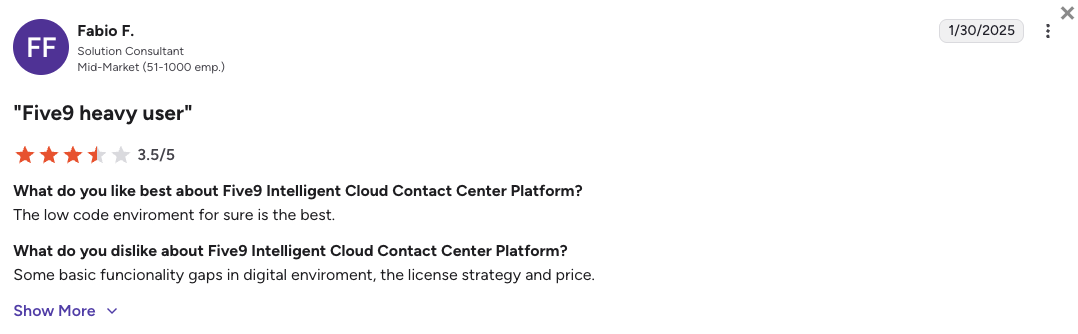
Five9 users praise the predictive dialing engine and the depth of its WFM tools. The consistent criticisms are a dated admin backend that feels like enterprise software from a decade ago, and Tier 1 support that routes most issues through offshore helpdesks.
How Do G2 Users Rate Five9?
Five9’s current G2 rating is 4.1/5, out of 500+ verified user reviews.
7. Zoom Contact Center: Best for Teams Already Inside the Zoom Ecosystem
What Is Zoom Contact Center?
Zoom Contact Center is the CCaaS extension of Zoom Workplace, the same platform millions of teams already use for video meetings. It’s built for organizations that want a single vendor for both internal collaboration and external customer support.
Why Is Zoom Contact Center a Strong Talkdesk Competitor?
-
Zero learning curve for Zoom-native teamsIf your team already lives in Zoom for meetings and messaging, adding Contact Center is a natural extension. Agents use the same app they already know. No retraining, no parallel system to log into.
-
Visual IVR flow builder and real-time AIZoom Contact Center includes a drag-and-drop routing flow editor, AI transcription, and real-time supervisor coaching, all natively within the same platform where your agents already work.
-
Single vendor for internal and external communicationsOne platform for internal video, chat, and phone plus external contact center simplifies vendor management and reduces integration points.
What Are the Pros & Cons of Zoom Contact Center?
| Pros | Cons |
|---|---|
| No new app for Zoom-native teams, agents already know it | Contact Center Essentials starts at $69/user/mo, expensive for basic inbound needs |
| Visual IVR flow builder simplifies complex routing configuration | Outbound dialing is limited, Power and Preview Dialers only on Premium and Elite tiers |
| Unified internal + external comms reduces vendor and integration complexity | Zoom Phone and Contact Center are separate licenses, budget for both for mixed teams |
What Are Zoom Contact Center’s Plans & Pricing?
Zoom Contact Center pricing starts at $69/user/month (billed annually), with the following plans:
Zoom Contact Center Pricing Plans
| Plan | Price (annual billing) | Key Features |
|---|---|---|
| Zoom Phone Unlimited | $16/user/mo | Internal business calling only (not a contact center product) |
| Contact Center Essentials | $69/user/mo | Inbound routing, IVR, AI transcription, supervisor tools |
| Contact Center Premium | $99/user/mo | Everything in Essentials + Power Dialer, advanced analytics, WFM add-on |
| Contact Center Elite | $149/user/mo | Everything in Premium + AI Voice Agents, workforce engagement suite |
Zoom Phone and Zoom Contact Center Are Separate Products
If your team needs both internal calling and external customer contact, you’ll need separate licenses for Zoom Phone and Zoom Contact Center. A team of 20 agents needing both would be looking at $85–$115/user/mo combined, approaching Talkdesk’s entry price.
What Are Customers Saying?
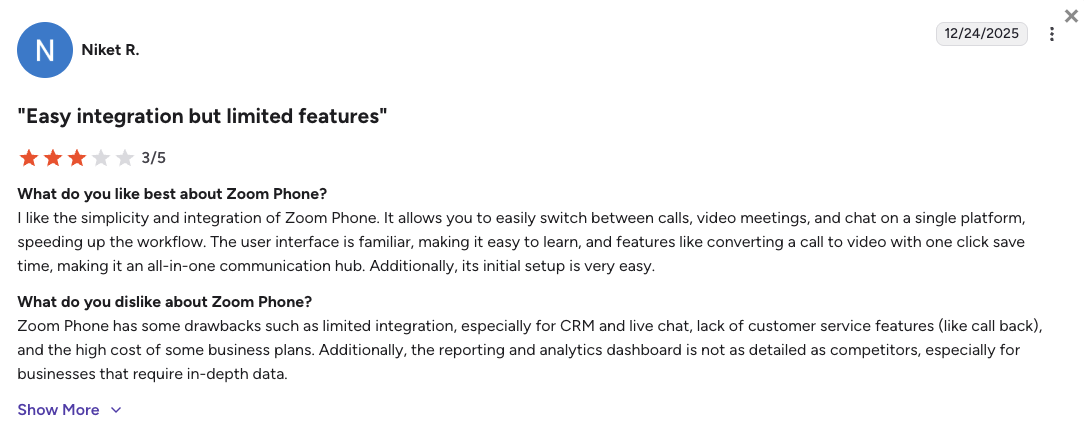
Zoom Contact Center users praise the seamless experience for Zoom-native teams and the excellent call audio quality. The most common criticism is that the platform is too basic for dedicated sales floors, outbound teams quickly hit the ceiling on dialer functionality.
How Do G2 Users Rate Zoom Contact Center?
Zoom Contact Center’s current G2 rating is 4.3/5, out of 50+ verified user reviews.
8. Ringover: Best for Predictable International Calling Costs and Live Coaching
What Is Ringover?
Ringover is a European cloud communications platform with a strong focus on sales floor supervision and flat-rate international calling. It’s a popular pick for recruiting agencies and international outbound teams that want predictable monthly bills without surprise per-minute international charges.
Why Is Ringover a Strong Talkdesk Competitor?
-
Flat-rate unlimited calls to 90+ countriesRingover’s Smart plan ($21/user/mo) includes flat-rate calls to 90+ destinations. Talkdesk uses metered rates for international calls, creating unpredictable month-end invoices.
-
Live supervisor coaching built in, whisper, barge, and double-listenCall whispering, barging, and double-listening are all included on the Business plan, without the complex setup overhead of Talkdesk’s workforce management tools.
-
Native Power Dialer for outbound teamsThe Business plan includes a Power Dialer for outbound teams, a meaningful addition at $44-47/user/mo compared to what Talkdesk charges for equivalent outbound functionality at higher tiers.
What Are the Pros & Cons of Ringover?
| Pros | Cons |
|---|---|
| Flat-rate unlimited calling to 90+ countries from $21/user | Conversational AI (Empower) costs an extra $39/user/mo on top of the base plan |
| Live coaching tools (whisper, barge, double-listen) on Business plan | AI Voice Agents billed per minute ($0.39/min), costs unpredictable at volume |
| Power Dialer included on the Business plan | Limited brand recognition and support coverage outside Europe compared to larger platforms |
What Are Ringover’s Plans & Pricing?
Ringover pricing starts at $21/user/month (billed annually), with the following plans:
Ringover Pricing Plans
| Plan | Price (annual billing) | Key Features |
|---|---|---|
| Smart | $21/user/mo | Unlimited calls to 90+ countries, IVR, call recording, basic analytics |
| Business | $44–47/user/mo | Everything in Smart + Power Dialer, whisper/barge coaching, CRM integrations |
| Advanced | $54/user/mo | Everything in Business + advanced analytics, custom integrations, priority support |
Factor in the Empower AI Add-On
Ringover’s base plans are great for calling volume, but AI transcription, sentiment analysis, and coaching analytics all require the Empower add-on, an extra $39/user/mo. A Business + Empower combination runs $83–$86/user/mo, which approaches Talkdesk’s entry price. Compare the full bundle, not just the headline rate.
What Are Customers Saying?
Ringover users consistently praise call stability for international routes and the effectiveness of the live coaching tools for training new reps. The main frustrations are AI pricing surprises and limited support coverage for teams outside Europe.
How Do G2 Users Rate Ringover?
Ringover’s current G2 rating is 4.6/5, out of 450+ verified user reviews.
9. 8×8: Best for Single-Vendor UCaaS and CCaaS with Built-In Compliance
What Is 8×8?
8×8 is a legacy telecom provider that operates its own global network, not leased infrastructure from Twilio or Bandwidth. It offers UCaaS and CCaaS natively in one platform, which appeals to regulated industries like healthcare and financial services that need compliance certifications baked in rather than bolted on.
Why Is 8×8 a Strong Alternative to Talkdesk?
-
Proprietary global network for maximum reliability8×8 owns its carrier infrastructure rather than leasing it from third parties. This reduces outage dependencies and enables stronger compliance certifications, HIPAA, FINRA, and GDPR, directly from the platform.
-
Single vendor for UCaaS and CCaaSUCaaS and CCaaS on a single license means no separate contracts for business phone and contact center. For IT procurement teams, this simplifies renewals, support escalations, and security reviews.
-
Unlimited international calling to up to 48 countriesOn higher tiers, 8×8 includes unlimited calling to up to 48 countries natively, without the metered international rate surprises that Talkdesk users in global operations frequently complain about.
What Are the Pros & Cons of 8×8?
| Pros | Cons |
|---|---|
| Proprietary network for elite reliability and compliance certifications | Notoriously opaque pricing, most contracts require sales negotiation |
| Native HIPAA and FINRA compliance, no additional vendor agreements | Dated admin interface with a steep learning curve for new administrators |
| Single-vendor UCaaS + CCaaS simplifies IT procurement | Voice CCaaS (X6) starts at $85–$120/user/mo, no meaningful price advantage over Talkdesk |
What Are 8×8’s Plans & Pricing?
8×8 contact center pricing starts at $85/user/month (billed annually), with the following plans:
8×8 Pricing Plans
| Plan | Price (annual billing) | Key Features |
|---|---|---|
| X2 / X4 (UCaaS) | $24–$57/user/mo | Business phone, video meetings, messaging (not a contact center product) |
| X6 (Voice CCaaS) | $85–$120/user/mo | Inbound + outbound voice contact center, IVR, analytics, HIPAA/FINRA compliance |
| X7 (Omnichannel) | $110–$130/user/mo | Everything in X6 + digital channels (chat, email, SMS) |
| X8 (Enterprise) | $135–$160+/user/mo | Everything in X7 + advanced AI, WFM, enterprise compliance |
8×8 Pricing Usually Requires a Sales Conversation
Published 8×8 pricing is approximate. Most organizations end up with negotiated custom contracts, and the procurement cycle can take several weeks. If you need to move quickly, budget for a longer sales process when evaluating 8×8 as a Talkdesk alternative.
What Are Customers Saying?
8×8 users in regulated industries consistently praise the platform’s reliability and compliance credentials. The most common frustrations are a dated admin UI that requires significant ramp-up time and a procurement process that moves slowly compared to more self-serve platforms.
How Do G2 Users Rate 8×8?
8×8’s current G2 rating is 4.1/5, out of 200+ verified user reviews.
10. Avaya: Best for Legacy Enterprises Transitioning to Cloud Infrastructure
What Is Avaya?
Avaya is the traditional enterprise telecom giant, built for organizations that have been running physical PBX systems for decades and need a secure, structured path to the cloud without tearing down existing infrastructure. It’s rarely the right choice for cloud-native teams.
Why Is Avaya a Strong Talkdesk Alternative?
-
Hybrid cloud and on-premise deployment in one platformAvaya’s Experience Platform bridges existing on-premise hardware and cloud contact center, without requiring a full infrastructure teardown. Talkdesk is strictly cloud-native and can’t support this type of mixed architecture.
-
Engineered for massive concurrency and complex routingAvaya handles thousands of concurrent calls and supports multi-layered routing logic built for government agencies, hospital networks, and financial institutions.
-
Built-in compliance for highly regulated sectorsOut-of-the-box compliance for healthcare, government, and financial services makes Avaya the default choice when regulatory requirements include on-premise data residency or FedRAMP authorization.
What Are the Pros & Cons of Avaya?
| Pros | Cons |
|---|---|
| Hybrid cloud and on-premise architecture for legacy migration paths | Complex deployments take months, rarely chosen by agile or growing teams |
| Built for massive concurrency, thousands of concurrent calls natively | Experience Platform All Media starts at $125/user/mo, among the most expensive options listed |
| Enterprise-grade compliance for government, healthcare, and financial sectors | Not designed for cloud-native SMB or mid-market contact centers |
What Are Avaya’s Plans & Pricing?
Avaya Experience Platform pricing starts at $48/user/month (billed annually), with the following plans:
Avaya Pricing Plans
| Plan | Price (annual billing) | Key Features |
|---|---|---|
| Cloud Office Core | $20/user/mo | Business phone, messaging (not a contact center product) |
| Cloud Office Ultra | $35/user/mo | Everything in Core + video, team messaging, advanced analytics |
| Experience Platform Digital | $48/user/mo | Digital contact center (chat, email, SMS), no voice |
| Experience Platform All Media | $125/user/mo | Full omnichannel contact center: voice + digital + AI + WFM |
Avaya Is Rarely the Right Choice for Cloud-Native Teams
Avaya is the right platform when you’re managing an active Avaya hardware installation and need a structured migration path to cloud, or when you operate in a sector with strict on-premise data requirements. For cloud-native teams under 500 agents, the deployment complexity and price rarely justify it.
What Are Customers Saying?
Avaya users in enterprise IT departments appreciate the platform’s stability for managing legacy transitions. The consistent criticism is that the platform feels dated compared to cloud-native alternatives, and that deployment timelines stretch far beyond what modern agile contact centers can tolerate.
How Do G2 Users Rate Avaya?
Avaya’s current G2 rating is 4.2/5, out of 250+ verified user reviews.
What Real Users Are Saying about Talkdesk and Its Alternatives
Review communities give you a different picture than vendor websites. Here’s what IT managers and CX professionals say when no one’s selling them anything.
What Redditors Are Saying about Talkdesk Alternatives
Three threads from r/ITManagers and r/customerexperience capture the same recurring themes: reliability failures, pricing frustration, and support that doesn’t show up when it matters.
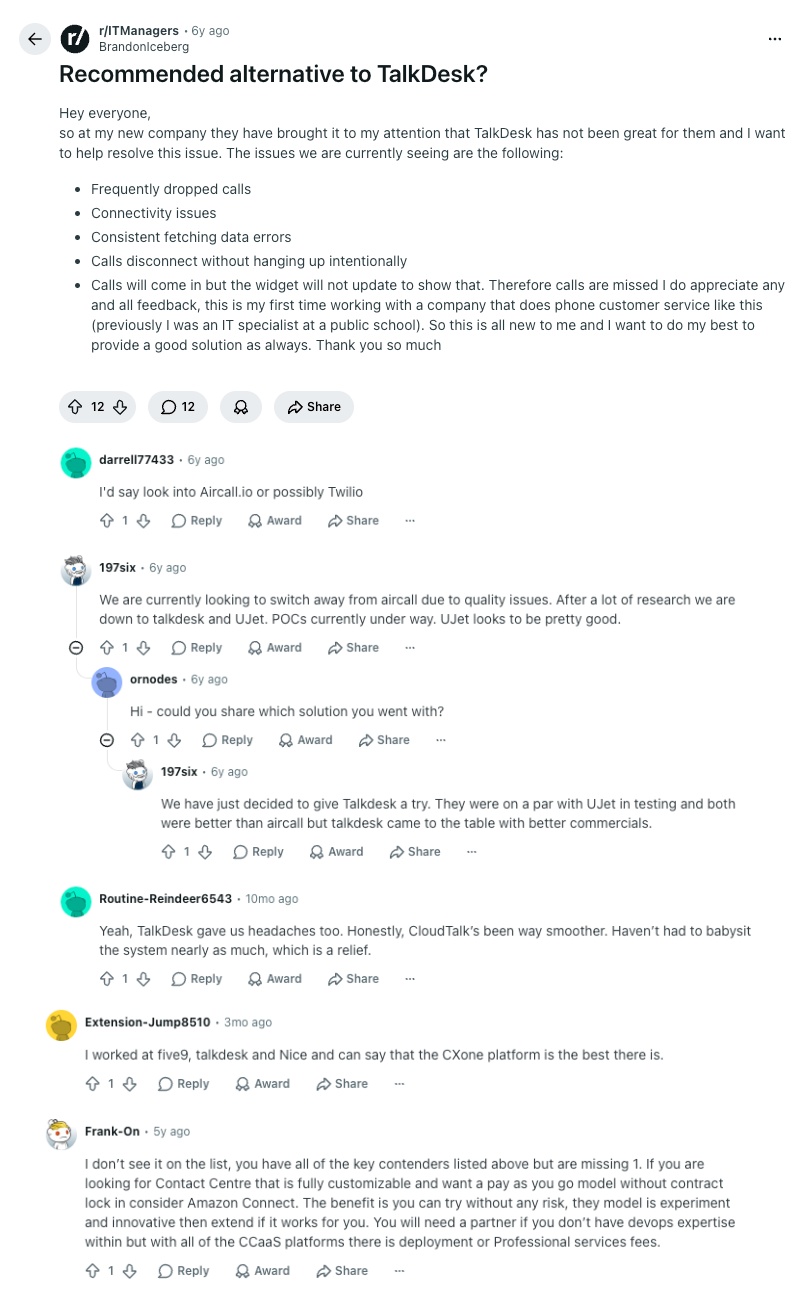
- Alternatives to TalkDesk: An IT manager dealing with dropped calls, connectivity failures, and a widget that misses incoming calls asks the community for a better option. Commenters suggest Aircall as the most practical switch. A later comment from someone who had already made the move mentions CloudTalk as noticeably smoother and far less effort to maintain day-to-day.
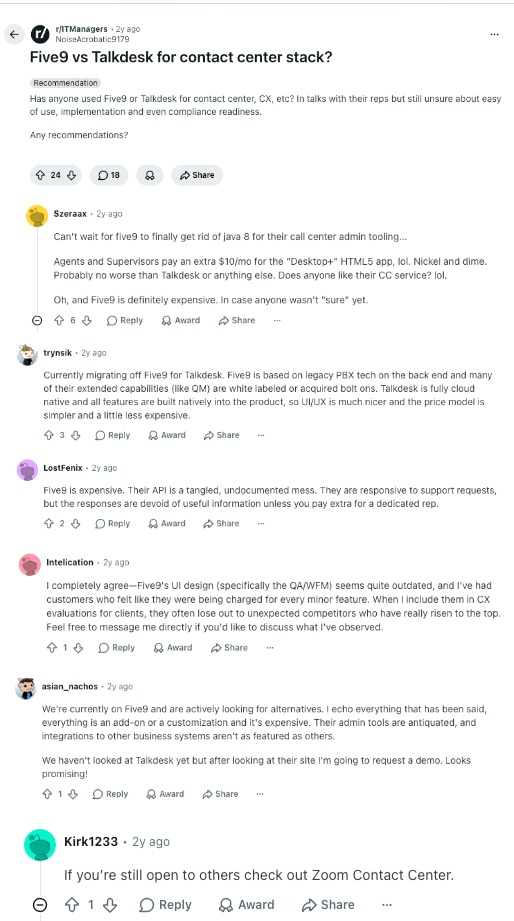
- Five9 vs Talkdesk: A comparison thread between Five9 and Talkdesk. Five9 draws criticism for its Java-based admin interface, add-on fees for what should be standard features, and support that only becomes useful once you pay for a dedicated rep. One commenter moving from Five9 to Talkdesk praises the cleaner UI and simpler pricing model, though others in the thread point out Talkdesk’s own pricing gaps once you move past the base tier.
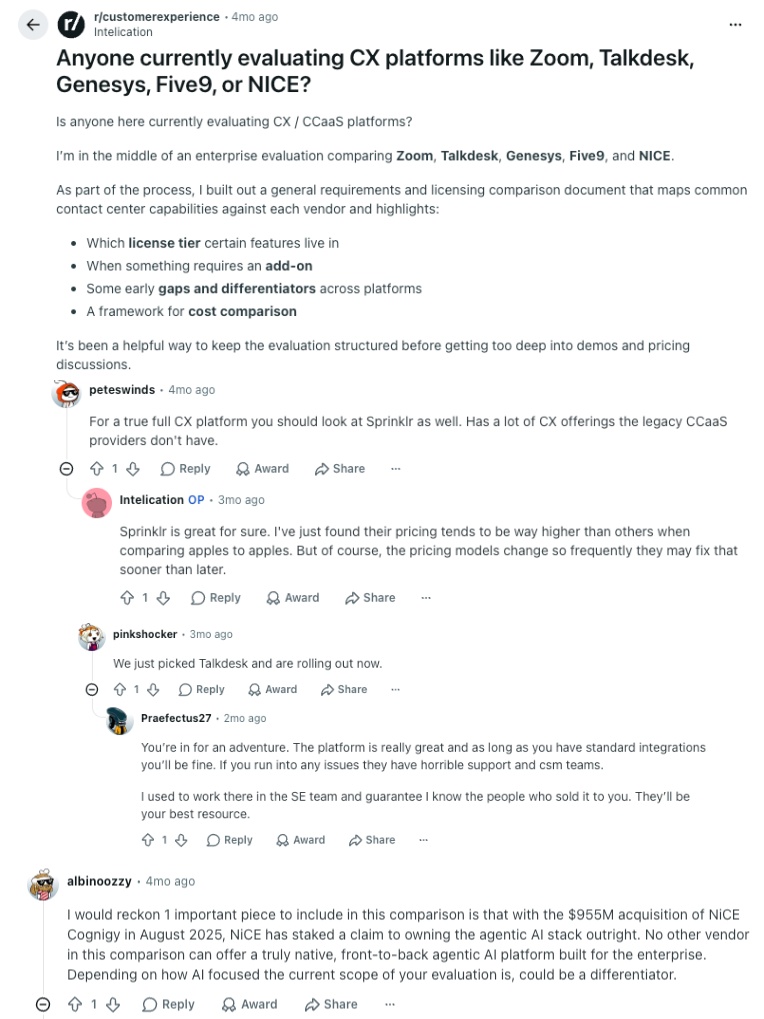
- Evaluating CX Platforms: An enterprise buyer publicly documenting their evaluation of Zoom, Talkdesk, Genesys, Five9, and NICE CXone asks for community input. A commenter who recently went live on Talkdesk warns the thread about poor support and CSM experience, a pattern that holds even at higher tiers.
What Quora Users Are Asking about Talkdesk Alternatives
Three independent Quora answers place CloudTalk, Aircall, and JustCall as the go-to alternatives across pricing, AI features, and sales floor tooling.
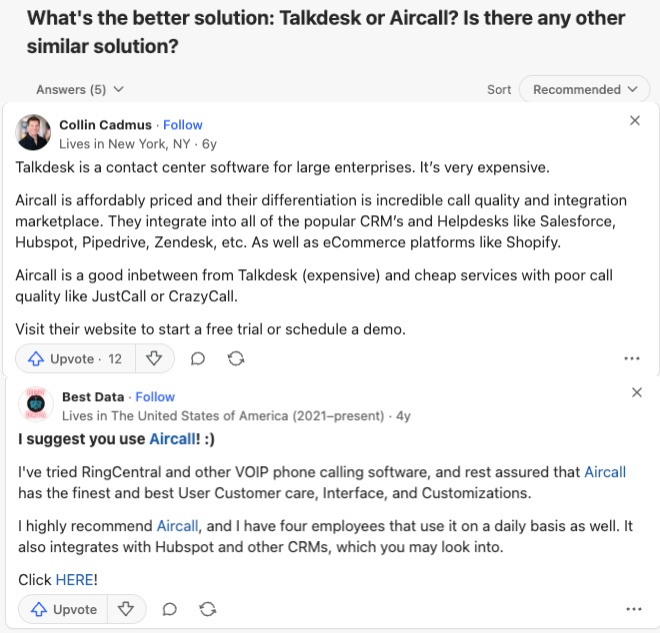
- Talkdesk vs Aircall: A respondent with sales leadership experience frames the choice cleanly: Talkdesk is built for large enterprises and priced accordingly; Aircall is the affordable middle ground for teams that need solid integrations without the enterprise overhead. A second answer recommends Aircall specifically for its CRM marketplace and call quality.
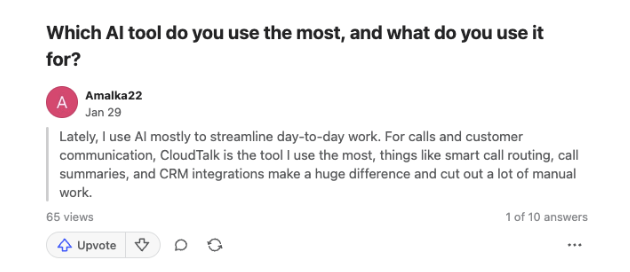
- AI tools in call center: One respondent highlights CloudTalk as their primary tool for calls and customer communication. They specifically call out smart call routing, call summaries, and CRM integrations as the features that reduce the most manual work: practical validation of CloudTalk’s flat-rate AI add-on approach.
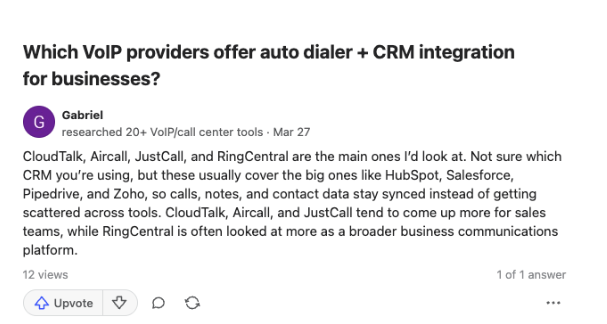
- Auto dialers and CRM integrations: A reviewer who personally researched 20+ VoIP platforms names CloudTalk, Aircall, and JustCall as the top picks for sales teams. The specific reason: calls, notes, and contact data stay synced across tools instead of getting scattered.
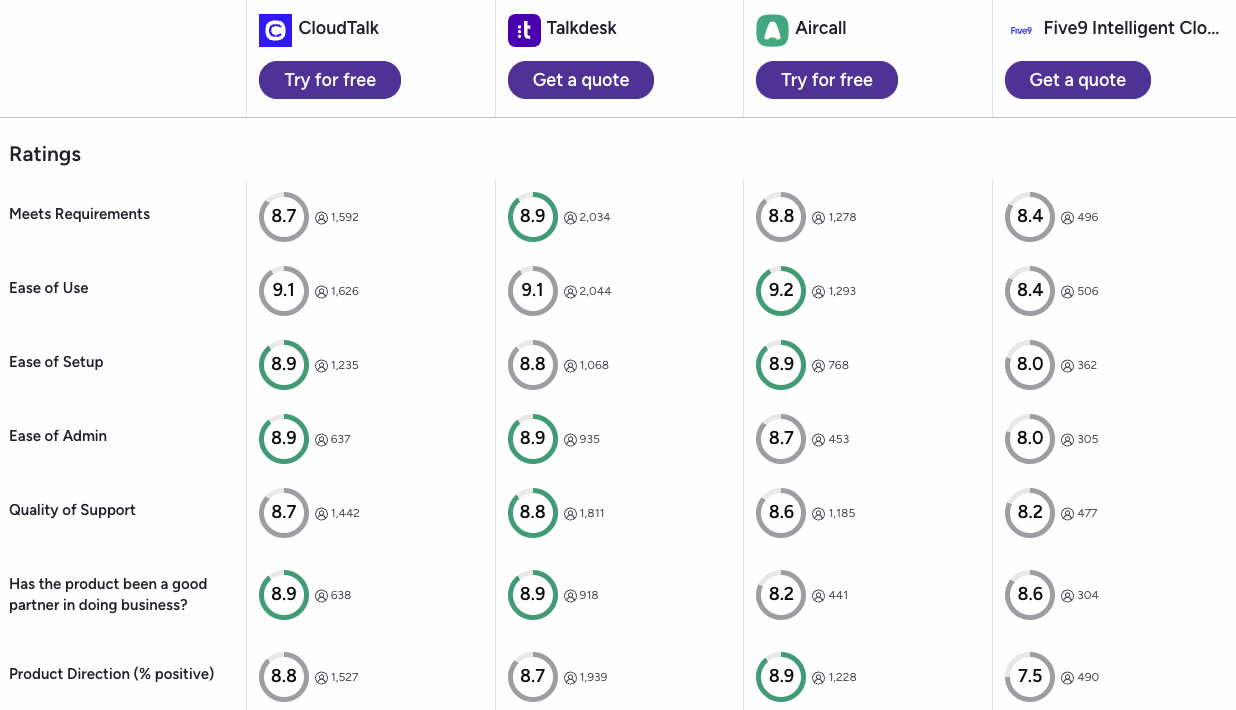
How CloudTalk, Talkdesk, Aircall, and Five9 Compare on G2
G2’s verified comparison data across seven user experience categories shows where each platform earns its reputation, and where the gaps are most telling.
- Ease of Setup (CloudTalk 8.9, Talkdesk 8.8, Five9 8.0): CloudTalk ties Aircall at the top of this category. For teams that need to move quickly, that 0.1 difference over Talkdesk matters, and Five9’s 8.0 reflects the lengthy enterprise deployments it’s known for.
- Good Partner in Doing Business (CloudTalk 8.9, tied with Talkdesk, ahead of Aircall 8.2): Users rate CloudTalk as a reliable long-term partner, not just an easy platform to onboard. This score reflects relationship quality: support responsiveness, account management, and trust over time.
- Product Direction (CloudTalk 8.8, Talkdesk 8.7, Five9 7.5): CloudTalk leads on forward momentum. Five9 trails by a wide margin, with a 7.5 that reflects user skepticism about the platform’s pace of development. CloudTalk’s score shows users see it as a platform that’s improving, not standing still.
CloudTalk vs. Talkdesk: Final Head-to-Head Comparison
The core difference comes down to who each platform is actually built for. Talkdesk is engineered for enterprise compliance teams and large contact centers. CloudTalk is built to help scaling SMB and mid-market teams grow without the financial overhead or IT complexity that makes Talkdesk impractical for most businesses under 200 agents.
CloudTalk vs. Talkdesk: Full Feature Comparison
| Feature | CloudTalk | Talkdesk | Winner |
|---|---|---|---|
| Starting Price (annual billing) | $19/user/mo | $85/user/mo (basic voice only) | CloudTalk |
| Free Trial | 14 days, no credit card | No free trial | CloudTalk |
| Minimum Agents | 1 user | 1 user | Tie |
| Reliability / Uptime SLA | 99.999% uptime, multi-carrier failover, browser-based | Reports of audio drops and firewall conflicts with AppData/Local desktop app | CloudTalk |
| Global Coverage | 160+ countries | Limited regional coverage | CloudTalk |
| CRM Integrations | 100+ native, deep-sync from Essential; Salesforce on Expert | Yes, but brittle Salesforce sync reported by G2 and Reddit users | CloudTalk |
| AI Transcription | Flat-rate add-on ($9/mo) on any plan | Elite tier only ($145+/user/mo) | CloudTalk |
| Outbound Dialers | Power, Smart, Parallel Dialer (Expert plan + add-on) | Basic outbound dialing; advanced dialing limited on lower tiers | CloudTalk |
| AI Voice Agents | Predictable bundles from $99/mo (AI Receptionist) and $349/mo (AI Voice Agents) | Elite tier required ($145–$165+/user/mo) | CloudTalk |
| Industry-Specific Compliance Clouds | Standard compliance certifications | FedRAMP, HIPAA, and financial services Experience Clouds | Talkdesk |
| Customer Support Quality | 24/7 live support; phone support on Expert plan | Heavily offshored Tier 1; slow response times; TAM required for complex issues | CloudTalk |
| G2 Rating | 4.4/5 (1,800+ reviews) | 4.4/5 (2,500+ reviews) | Talkdesk |
What Talkdesk's AppData/Local Architecture Actually Means for Your IT Team
Talkdesk’s desktop softphone installs inside the Windows AppData\Local directory, a user-space path that bypasses standard software management controls. Security-hardened endpoints typically block writes to this directory, triggering UAC prompts and firewall alerts. IT teams managing 50+ endpoints report spending significant time on manual exceptions after every Talkdesk update. CloudTalk runs entirely in the browser: no installation, no UAC, no firewall exceptions required.
How to Choose the Right Talkdesk Alternative for Your Business
When choosing a Talkdesk alternative, focus on what’s costing your team the most right now. The right answer depends on your team size, your CRM stack, and whether your primary pain point is pricing, reliability, support, or outbound capabilities.
What Is the Best Talkdesk Alternative for Teams on a Tight Budget?
If you’re on a tight budget, CloudTalk and Ringover are the strongest options. CloudTalk starts at $19/user/month and includes call recording, call queues, and visual call flow builder, features Talkdesk gates behind higher tiers. Ringover offers flat-rate international calling from $21/user/month for teams with high international call volumes. Both platforms include a free trial, which Talkdesk does not offer.
What Is the Best Talkdesk Alternative for CRM Integration Reliability?
For reliable CRM integration, CloudTalk and Aircall are the top picks. CloudTalk offers direct, stable sync to Salesforce (Expert plan), HubSpot, Zendesk, and 100+ other tools, auto-logging every call, transcript, and contact update without audio drops. Aircall’s 250+ marketplace integrations cover virtually every CRM and helpdesk with zero-code setup. Both directly fix the data-drop issues that Talkdesk users consistently report.
What Is the Best Talkdesk Alternative for Outbound Sales Teams?
For outbound sales teams, CloudTalk delivers the best overall toolkit: Power, Smart, and Parallel Dialers plus deep CRM sync, all available without the enterprise pricing wall. For pure dialing velocity, JustCall is the stronger pick: the Power Dialer is available from the $49 Pro tier, and AI transcription is bundled from the base $29 plan, so reps get automatic call notes without a separate upgrade.
Which Talkdesk Alternative Has the Most Predictable AI Costs?
For predictable AI costs, CloudTalk is the clear leader. Conversation Intelligence costs $9/mo regardless of call volume. AI Receptionists start at $99/mo and AI Voice Agents at $349/mo, predictable bundles, not per-minute billing. JustCall bundles AI transcription natively from its base plan. Avoid per-minute AI models (Aircall at $0.19–$0.49/min, Ringover at $0.39/min) if your team handles high call volumes.
Which Talkdesk Alternative Is Best for Mid-Market Teams That Need Faster Deployment?
For mid-market teams that need to move quickly, Aircall deploys the fastest: most teams are live in under a day. CloudTalk is close behind, with a dedicated onboarding portal and responsive setup support. The key difference: Aircall is better for fast go-live with existing CRM connections, while CloudTalk is the better long-term investment if your team also needs outbound dialers, AI add-ons, or phone support.
Which Talkdesk Alternatives Are Best for Enterprise Deployments?
At enterprise scale, each platform serves a distinct use case. Five9 is the pick for predictive dialing at scale (50+ agent minimum, $159/user/mo base). Avaya suits organizations managing hybrid cloud and on-premise transitions. 8×8 works best when you need single-vendor UCaaS and CCaaS with native HIPAA and FINRA compliance.
None of these are viable for teams under 50 agents: the seat minimums, pricing, and deployment complexity make them impractical. That’s where CloudTalk becomes the clear fit.
What Is the Best Talkdesk Alternative for Growing Businesses Overall?
For growing businesses overall, CloudTalk is the clear choice. It solves Talkdesk’s biggest pain points: enterprise pricing walls, unreliable CRM sync, and slow support, without adding enterprise-level complexity or cost.
CloudTalk scales from a single agent to hundreds, works reliably out of the box, and gives growing teams the outbound tools and AI capabilities they need. Starting at $19/user/month with a 14-day free trial and no credit card required, it’s also the most accessible way to validate the switch before committing.
Ready to Make the Switch from Talkdesk?
Growing sales and support teams don’t need to pay $115+ per user just to access call recording and a CRM API. They need a platform that works reliably out of the box, connects to their CRM without dropping data, and actually picks up the phone when something goes wrong.
Here’s what you get from day one when you switch from Talkdesk to CloudTalk:
-
Infrastructure that doesn’t fight your IT team99.999% uptime, multi-carrier failover, and a browser-based app that doesn’t require AppData/Local installation or UAC overrides.
-
CRM sync that just worksEvery call, transcript, and contact update logs automatically into Salesforce, HubSpot, Zendesk, or whichever CRM your team relies on. No blank screens, no manual re-entry, no missed case creation mid-call.
-
AI tools you can actually budget forFlat-rate Conversation Intelligence add-on, predictable AI Voice Agent bundles, and smart dialers. No per-minute fee surprises.
-
Support that shows up when you need it24/7 live support with phone access on the Expert plan. Not a Tier 1 script routed through an offshore helpdesk.
Not Sure Which Talkdesk Alternative Is Right for You?
Frequently Asked Questions about Talkdesk Alternatives
Answers to the most common questions about switching from Talkdesk and choosing the right contact center alternative.