10 Best Ooma Alternatives: TL;DR Comparison Table
| # | Tool | Best For | Starting Price (annual billing) | G2 Rating |
|---|---|---|---|---|
| 1 | CloudTalk | SMB and mid-market sales & support teams | $19/user/mo | 4.4/5 |
| 2 | Google Voice | Google Workspace users and budget-conscious solopreneurs | $10/user/mo (+ Google Workspace) | 4.1/5 |
| 3 | Zoom Phone | Startups and budget-conscious teams | $16/user/mo (metered) | 4.6/5 |
| 4 | Nextiva | Growing businesses needing omnichannel customer engagement | $15/user/mo | 4.5/5 |
| 5 | Quo (formerly OpenPhone) | Mobile-first teams and fast setup | $15/user/mo | 4.7/5 |
| 6 | Vonage | API-customizable systems for tech-savvy teams | $13.99/line/mo | 4.3/5 |
| 7 | RingCentral | Mid-market teams needing enterprise-grade unified comms | $20/user/mo | 4.2/5 |
| 8 | Dialpad | AI-first business phone systems | $15/user/mo | 4.4/5 |
| 9 | Grasshopper | Solopreneurs and micro-businesses | $14/mo (flat rate) | 3.9/5 |
| 10 | GoTo Connect | SMBs wanting bundled voice, video, and meetings | $26/user/mo | 4.4/5 |
Skip the Reading. See It Live.
Why Teams Are Searching for an Ooma Alternative
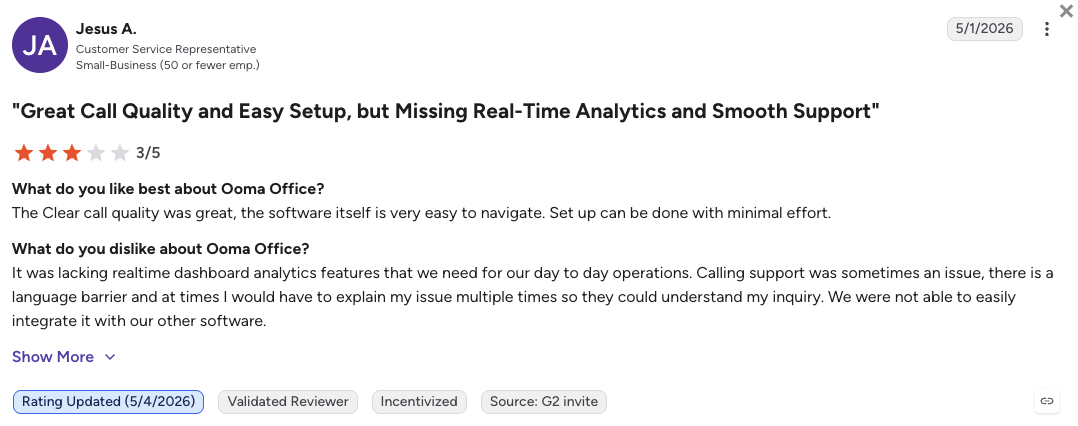
Teams start looking for Ooma alternatives the moment they realize what Ooma’s pricing actually covers at each tier. The Essentials plan ($19.95/user/mo) handles basic calls, but call recording, the desktop app, and video meetings require the Pro tier ($24.95). CRM integrations with Salesforce and HubSpot are locked behind Pro Plus at $29.95, the most expensive public tier. And there is no free trial to test any of this before committing.
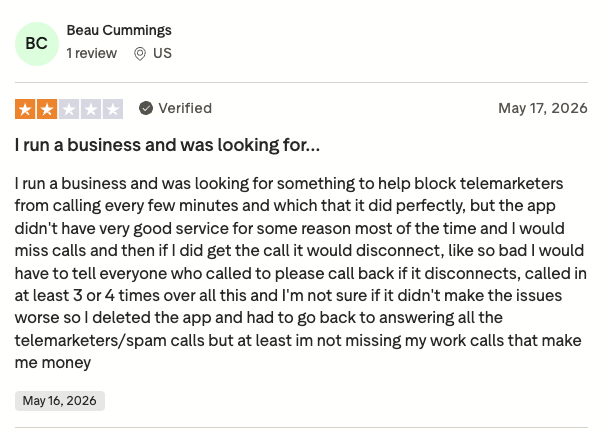
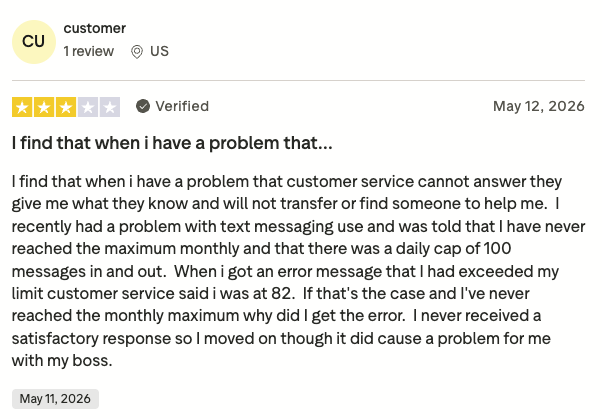
Based on verified reviews on G2 (where Ooma scores 4.5/5 from 130+ reviews), Trustpilot (where it averages 3.3/5 out of 2,000+ reviews), Reddit, and Quora, here are the five operational problems Ooma users consistently run into.
5 Main Cons of Ooma That Make Growing Teams Leave
-
Call recording is locked behind Pro ($24.95/user/mo)Ooma’s Essentials plan doesn’t include call recording. It’s a standard operational feature for any sales or support team, but on Ooma it’s an upgrade. You’re forced to pay 25% more just to record your own calls.
-
CRM integrations require the top-tier planSalesforce and HubSpot integrations are locked behind Pro Plus at $29.95/user/mo. That’s Ooma’s most expensive public tier. Teams that need their phone system to sync with their CRM have no lower-cost option. Many users also complain about CRM reliability as they’ve been experiencing syncing issues.
-
No free trial, credit card required upfrontOoma doesn’t offer a free trial. The 30-day money-back guarantee requires a credit card at signup. Most serious alternatives offer 14 to 30 days of hands-on testing before you commit to anything.
-
Mobile app drops calls and misses notificationsVerified G2 and Reddit users report that Ooma’s iPhone CallKit integration fails roughly 1 in 20 calls. Push notifications arrive late, meaning remote and mobile-first teams miss inbound calls silently.
-
Built for teams under 20, scales poorly beyond thatOoma’s SMS caps (1,000 messages/month on Pro Plus) and limited admin controls work fine for micro-businesses. Once your team crosses 20 seats, those limits create real day-to-day friction.
What Is the Best Alternative to Ooma?
CloudTalk is the best alternative to Ooma for growing SMB sales and support teams. The platform starts at $19/user/month, with the basic plan offering features like call recording, visual call flow builder, call queues, or click-to-call right from your CRM or browser, and coverage across 180 countries.
Why Do Teams Consider CloudTalk the Best Ooma Alternative?
The main reason CloudTalk wins against Ooma is that it gives growing teams a full contact center feature set without locking essentials behind top-tier plans. Once you start growing, the higher tiers and predictable add-ons let you in on reliable, two-way CRM sync, AI features (auto dialers, Conversation Intelligence, AI voice agents), and real-time analytics.
And unlike Ooma, CloudTalk offers a free 14-day trial, letting you test all its features before you commit, with no credit card required.
5 Reasons CloudTalk Is the Best Ooma Alternative
-
Call recording included from Starter ($25/user/mo)On CloudTalk, call recording is available on the Starter plan. You don’t need to upgrade to a higher tier to record your calls. That’s a $5/user/mo saving compared to Ooma’s equivalent Pro plan, and the feature is there from day one.
-
100+ CRM integrations from Essential ($29/user/mo)CloudTalk connects natively to HubSpot, Zendesk, Pipedrive, and 100+ other CRM tools. Salesforce deep-sync is on the Expert plan. Unlike Ooma, CloudTalk’s deep sync technology is extremely reliable, ensuring every call logs automatically, saving your reps hours on manual admin and database review.
-
AI Receptionist with 50 free minutes on every planEvery CloudTalk account includes 50 free AI Receptionist minutes pre-loaded, with no activation needed. Ooma has no native AI features. CloudTalk’s AI voice agents can handle after-hours calls from day one.
-
180 countries and 160 national number typesOoma covers the US, Canada, Mexico, and Puerto Rico for calling. CloudTalk provides virtual numbers in 180 countries with 160+ national number types.
-
Free 14-day trial with no credit card requiredCloudTalk lets you test the full platform for 14 days before committing. No credit card needed. Ooma’s 30-day money-back guarantee requires payment upfront. For teams comparing options, the difference matters.
Stop Paying for Features Ooma Locks Behind Paid Tiers
How We Tested and Rated Ooma Alternatives in 2026
To build this list, we reviewed pricing pages, technical documentation, and thousands of unfiltered user reviews across G2, Trustpilot, Reddit, and Quora. Our focus was on the small-to-mid-market segment: teams of 1 to 100 users replacing Ooma for a virtual phone system that grows with them.
We evaluated every platform against six criteria that matter most to teams switching away from Ooma.
-
Pricing transparencyWe compared the true cost at each tier, including what’s locked behind upgrades, add-on fees, and whether a free trial is available.
-
Call recording availabilityWe checked which tier includes call recording by default, a basic requirement for any sales or support team.
-
CRM integration depthWe looked at which plans include CRM integrations, which CRMs are supported, and whether call data syncs automatically or requires manual setup.
-
AI features and cost modelWe assessed whether AI features are bundled, gated behind enterprise tiers, or charged per minute. Flat-rate models score higher for teams trying to forecast costs.
-
Country and number coverageWe prioritized platforms with virtual numbers in multiple countries, especially for Canadian and international teams replacing Ooma’s limited geographic scope.
-
Mobile app reliabilityWe specifically checked for reported call drops, notification delays, and push reliability on iOS and Android, a known weak point for Ooma.
10 Best Ooma Alternatives: Feature Comparison
Here’s how Ooma stacks up against the four strongest alternatives across the features that matter most to small and mid-market teams.
Ooma vs. CloudTalk vs. Google Voice vs. Nextiva vs. Zoom Phone
| Feature | Ooma | CloudTalk | Google Voice | Nextiva | Zoom Phone |
|---|---|---|---|---|---|
| Starting Price (annual) | $19.95/user/mo | $19/user/mo | $10/user/mo (+ Workspace fee) | $15/user/mo | $10/user/mo (metered) |
| Free Trial |  |
 |
|
|
|
| Call Recording | Pro+ only ($24.95) | From Starter ($25/user/mo) | Premier only ($30/user/mo) | Engage+ ($25/user/mo) | |
| CRM Integrations | Pro Plus only ($29.95) | 100+ tools from Essential | No Salesforce or HubSpot | Engage+ ($25/user/mo) | HubSpot (2026 update) |
| AI Features | |
Conversation Intelligence, AI Voice Agent, AI Receptionist (50 free min) | |
AI assistant (Engage+) | Limited |
| Power Dialer | |
Expert plan or $15/mo add-on to any tier | |
|
|
| Country Coverage | US, Canada, Mexico, Puerto Rico | 180 countries | 14 countries | US & Canada (mainly) | 40+ countries |
| Reliable Mobile App | |
|
|
|
|
| 24/7 Customer Support | Limited hours | |
Knowledge base only | |
Business hours |
The Ooma Pricing Trap: What $19.95 Actually Gets You
Ooma’s Essentials plan at $19.95/user/mo covers basic inbound and outbound calls, a virtual receptionist, and unlimited calling in the US, Canada, Mexico, and Puerto Rico. Call recording requires the Pro plan at $24.95. CRM integrations, including Salesforce and HubSpot, require the Pro Plus plan at $29.95. Video meetings also require Pro+. There is no free trial. And there is no annual discount: the prices listed are month-to-month regardless of commitment. For a team of 10 needing CRM sync, the real Ooma cost is $299/mo, 50% more than the advertised entry price.
Get More for Less Than Ooma’s Pro Plus
Top 10 Ooma Alternatives for 2026: Detailed Breakdowns
Below are the 10 best alternatives to Ooma, ranked and reviewed. Each profile covers what the tool does, where it beats Ooma, its pros and cons, pricing, and real G2 user sentiment. CloudTalk leads as the best overall Ooma alternative for small business sales and support teams. The other nine Ooma business alternatives serve specific use cases, from budget solopreneurs to enterprise UCaaS buyers.
1. CloudTalk: Best Ooma Alternative for Growing Sales and Support Teams
What Is CloudTalk?
CloudTalk is an AI-powered cloud phone system built for SMB and mid-market sales and support teams. It sits between basic VoIP tools and monolithic enterprise platforms, giving growing teams a full contact center feature set without the six-figure contract or the IT overhead.
Unlike Ooma, which positions itself as a simple business phone for very small teams, CloudTalk is purpose-built for teams that need CRM integrations, outbound dialers, AI features, and multi-country number support from the start. Below are a few more reasons why CloudTalk is trusted by 4,000+ businesses worldwide.
Why Is CloudTalk a Strong Ooma Alternative?
-
Call recording included from Starter, no upgrade requiredOoma charges you $24.95/user/mo (Pro tier) just to record calls. CloudTalk includes call recording from the Starter plan at $25/user/mo. For a 10-person team, that’s a meaningful saving.
-
100+ CRM integrations from the Essential planCloudTalk connects natively to HubSpot, Zendesk, Pipedrive, and 100+ CRM tools from the Essential plan ($29/user/mo). Salesforce deep-sync is on Expert. Every call logs automatically, no manual data entry.
-
AI Receptionist with 50 free minutes on every planEvery CloudTalk account includes 50 free AI Receptionist minutes pre-loaded, ready to handle the routine right after a quick 10 min setup. Ooma has no AI features at any tier. For teams handling after-hours calls, this is an immediate advantage.
What Are the Pros & Cons of CloudTalk?
| Pros | Cons |
|---|---|
| Call recording included from Starter, no paywall | No native video meetings, you’ll need a separate tool |
| 100+ CRM integrations (Salesforce on Expert plan) | Salesforce deep-sync requires Expert ($49/user/mo) |
| AI Receptionist with 50 free minutes on every plan | Parallel Dialer is a paid add-on ($39/mo extra) |
| 180 countries, 160+ national number types | |
| Free 14-day trial, no credit card required |
What Are CloudTalk’s Plans & Pricing?
CloudTalk pricing starts at $19/user/month (billed annually), with the following plans:
CloudTalk Pricing Plans
| Plan | Price (annual billing) | Key Features |
|---|---|---|
| Lite | $19/user/mo | Unlimited inbound calls, IVR, call recording, basic analytics (restricted to NA & LATAM) |
| Starter | $25/user/mo | Everything in Lite + SMS, voicemail drop, call queues, click-to-call |
| Essential | $29/user/mo | Everything in Starter + 100+ CRM integrations, skill-based routing, workflow automation, real-time dashboards |
| Expert | $49/user/mo | Everything in Essential + Salesforce deep-sync, Power Dialer, Smart Dialer, phone support, 99% uptime SLA |
AI Add-On Pricing at a Glance
Conversation Intelligence: $9/mo flat rate. AI Receptionist: from $99/mo. AI Voice Agents: from $349/mo. Power Dialer: included on Expert. Parallel Dialer: $39/mo add-on. Salesforce integration: Expert plan.
What Are CloudTalk’s Customers Saying?
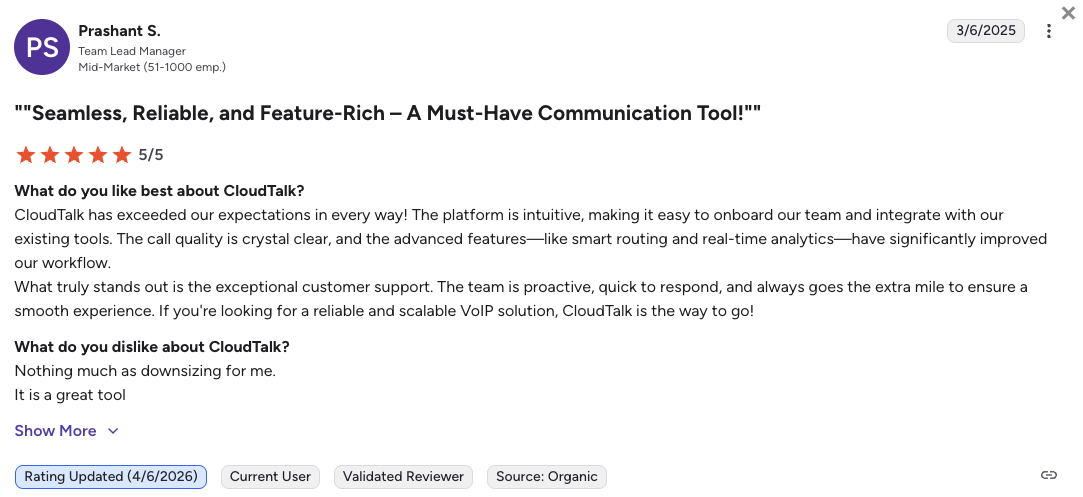
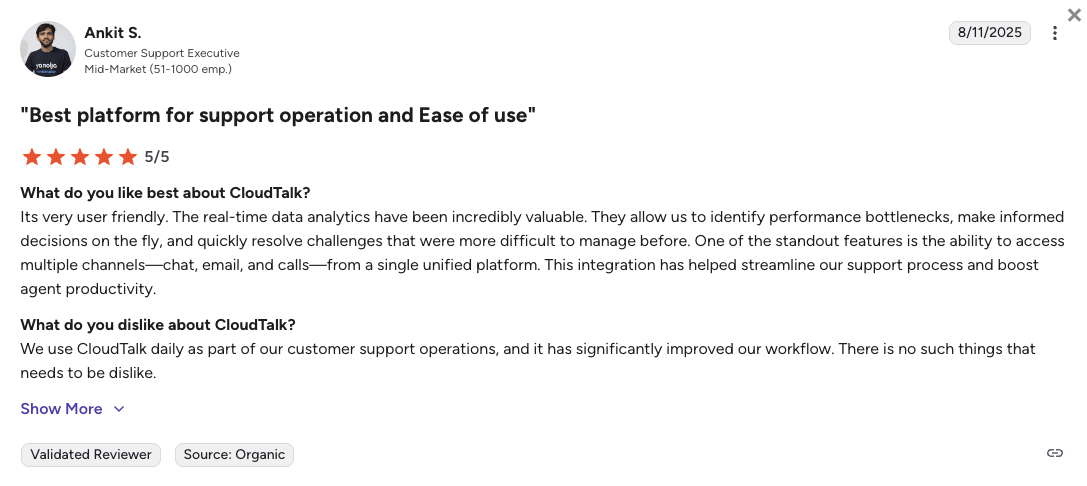
CloudTalk users consistently highlight three advantages over Ooma: CRM sync that doesn’t require manual cleanup, a support team that responds to complex tickets without multi-week delays, and pricing they can forecast without surprise upgrades. The most common frustration is that Salesforce integration requires the Expert plan.
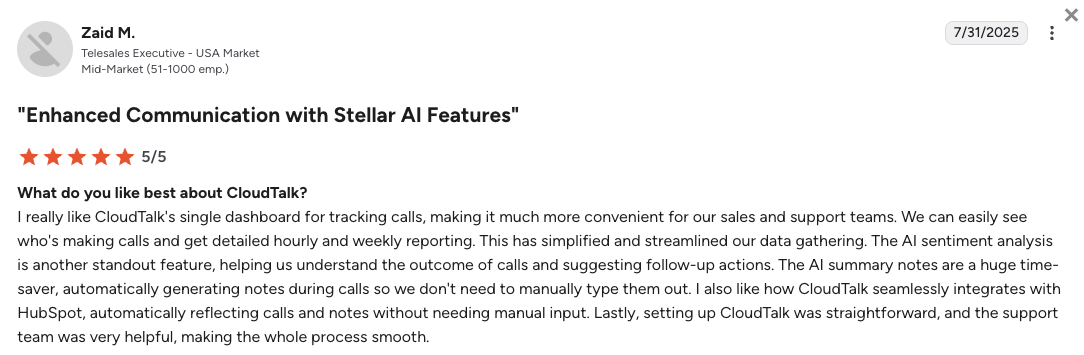
How Do G2 Users Rate CloudTalk?
CloudTalk’s current G2 rating is 4.4/5, out of 1,400+ verified user reviews.
See Why 4,000+ Teams Chose CloudTalk over Ooma
2. Google Voice: Best for Google Workspace Users and Budget Solopreneurs
What Is Google Voice?
Google Voice is a cloud-based virtual phone system built natively into Google Workspace. It’s designed for small teams and solopreneurs who already use Google Docs, Calendar, and Gmail and want a business number without switching tools.
Advertised at $10/user/mo, Google Voice requires a Google Workspace subscription (from $7/user/mo), so the real entry cost is $17/user/mo. It’s a solid Ooma alternative for Google-native teams, but it has significant limitations for businesses that need Salesforce, HubSpot, or toll-free numbers.
Why Is Google Voice a Strong Alternative to Ooma?
-
Seamless Google Workspace integrationGoogle Voice sits directly inside Gmail, Google Calendar, and Google Meet. If your team already runs on Google tools, setup takes minutes and agents never need to switch between apps.
-
Transparent, lower entry price for small teamsAt $10/user/mo (Starter), Google Voice costs less than Ooma’s Essentials at $19.95. For solopreneurs and very small teams not needing CRM sync, it’s a meaningful saving.
-
Auto-attendant and ring groups on Standard ($16/user/mo)Google Voice Standard adds auto-attendants and ring groups, features that help small businesses handle calls professionally without complex setup.
What Are the Pros & Cons of Google Voice?
| Pros | Cons |
|---|---|
| Tight Google Workspace integration, zero switching costs | No Salesforce or HubSpot integration at any tier |
| Lowest entry price on this list ($10/user/mo + Workspace) | Only available in 14 countries, poor fit for international teams |
| 14-day free trial available | No toll-free numbers, no Power Dialer, no AI features |
What Are Google Voice’s Plans & Pricing?
Google Voice pricing starts at $10/user/month (plus Google Workspace), with the following plans:
Google Voice Pricing Plans
| Plan | Price (annual billing) | Key Features |
|---|---|---|
| Starter | $10/user/mo (+ Workspace) | Calling, voicemail, SMS, Google Meet integration |
| Standard | $16/user/mo (+ Workspace) | Everything in Starter + auto-attendants, ring groups, desk phone support |
| Premier | $30/user/mo (+ Workspace) | Everything in Standard + auto call recording, advanced reporting, BigQuery integration |
The Google Voice Workspace Requirement
The $10/user/mo Starter price doesn’t include Google Workspace, which starts at $7/user/mo. The real minimum cost is $17/user/mo per seat, higher than it looks at first glance. Also, enabling an auto-attendant disables SMS for that number, which is a meaningful limitation if your team relies on texting customers.
What Are Google Voice’s Customers Saying?
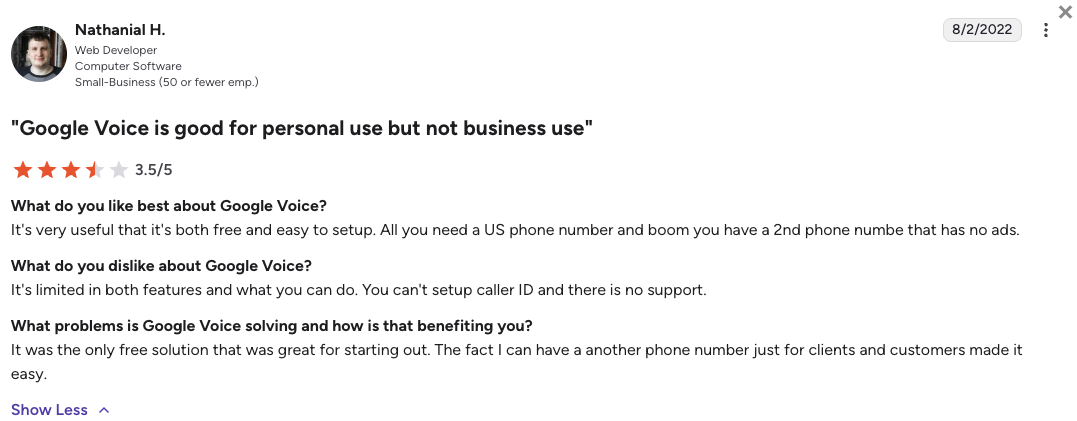
Google Voice users consistently praise the simplicity and the Google ecosystem fit: no learning curve, no new app. The most common complaints are the lack of CRM integrations beyond Google’s own tools and the limited country coverage, which makes it impractical for teams with international operations.
How Do G2 Users Rate Google Voice?
Google Voice holds a 4.1/5 rating on G2, based on 150+ verified reviews.
3. Zoom Phone: Best for Startups and Budget-Conscious Teams
What Is Zoom Phone?
Zoom Phone is the business calling layer built into Zoom Workplace. It adds inbound and outbound VoIP calling to the platform millions of teams already use for video meetings. Starting at $16/user/mo for unlimited domestic calling, it’s a cheaper entry than Ooma’s $19.95 flat rate for teams already inside the Zoom ecosystem.
Zoom Phone covers 40+ countries, includes a free trial, and integrates with HubSpot. It’s a strong Ooma alternative for startups that prioritize price and already live inside the Zoom ecosystem.
Why Is Zoom Phone a Strong Ooma Competitor?
-
Transparent, tiered pricing from $16/user/moZoom Phone’s entry plan at $16/user/mo includes unlimited domestic calling and is cheaper than Ooma’s Essentials at $19.95. Teams needing global coverage can step up to Global Select at $24.50/user/mo.
-
No new app for Zoom-native teamsIf your team already uses Zoom for meetings, Zoom Phone is in the same app. No onboarding friction, no parallel tool to manage.
-
40+ countries with global unlimited plansZoom Phone covers 40+ countries on its Global Select plan ($20/user/mo), well beyond Ooma’s US, Canada, Mexico, and Puerto Rico coverage.
What Are the Pros & Cons of Zoom Phone?
| Pros | Cons |
|---|---|
| Transparent pricing from $16/user/mo, cheaper than Ooma’s entry | Zoom Phone and Zoom Contact Center are separate licenses |
| Unified with Zoom Workplace, no new app | No Power Dialer or advanced outbound tools |
| 40+ countries on the Global Select plan | Customer support limited to business hours on most plans |
What Are Zoom Phone’s Plans & Pricing?
Zoom Phone pricing starts at $16/user/month (billed annually), with the following plans:
Zoom Phone Pricing Plans
| Plan | Price (annual billing) | Key Features |
|---|---|---|
| US & Canada Unlimited | $16/user/mo | Unlimited domestic calling, call recording, SMS, voicemail, HubSpot integration |
| Workplace Pro Plus | $20.50/user/mo | Everything in Unlimited + bundled Zoom Workplace premium (AI Companion, team chat, video meetings) |
| Global Select | $24.50/user/mo | Unlimited calling in one of 40+ countries, all Unlimited features |
Zoom Phone vs. Zoom Contact Center: Not the Same
Zoom Phone handles inbound and outbound calling for general business use. If your team needs call queues, IVR routing, and agent management, you need Zoom Contact Center, a separate license starting at $69/user/mo. Factor both into your cost comparison if you have a support or sales team.
What Are Zoom Phone’s Customers Saying?
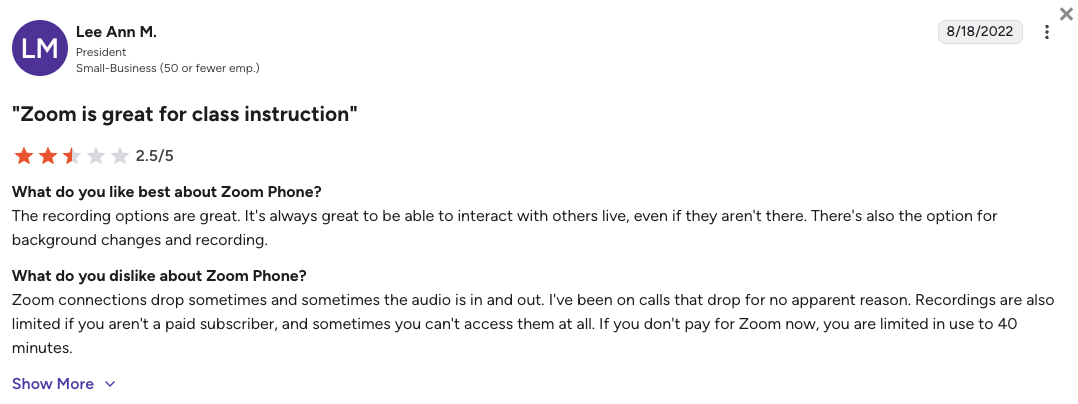
Zoom Phone users love that it lives inside the app they already have open all day. The most consistent complaints are about the separation between Zoom Phone and Zoom Contact Center, and the lack of outbound dialing tools for sales teams who need more than basic calling.
How Do G2 Users Rate Zoom Phone?
Zoom Phone holds a 4.6/5 rating on G2, based on 2,600+ verified reviews.
4. Nextiva: Best for Growing Businesses Needing Omnichannel Engagement
What Is Nextiva?
Nextiva is a unified communications platform that combines voice calling, email, live chat, and social messaging in a single workspace. It’s built for growing businesses that want to consolidate multiple customer communication channels into one platform rather than just replace a basic phone system.
Starting at $15/user/mo (Core, annual billing), Nextiva costs less than Ooma at the entry level. But the meaningful omnichannel and CRM features live on the Engage plan ($25/user/mo) and above. It recently restructured its plans in early 2026, moving from four tiers to three.
Why Is Nextiva a Strong Alternative to Ooma?
-
Omnichannel from one platform: voice, email, chat, socialNextiva unifies phone calls, email, live chat, and social messaging in one workspace. Ooma is voice-only. If your team needs to manage customer conversations across channels without patching together separate tools, Nextiva is the stronger choice.
-
Strong customer support reputationNextiva is consistently rated highly for support responsiveness. Ooma users on G2 and Reddit frequently report difficulty reaching support for technical issues.
-
AI assistant features on Engage and aboveNextiva’s Engage plan includes AI-assisted call summaries and an AI assistant for real-time guidance. Ooma has no AI features at any tier.
What Are the Pros & Cons of Nextiva?
| Pros | Cons |
|---|---|
| Omnichannel: voice + email + chat + social in one platform | Regulatory fees add $5.45/line/mo on top of plan price |
| Strong support reputation, rated above average on G2 | CRM integrations and call recording locked behind Engage ($25/user/mo) |
| Core plan at $15/user/mo is cheaper than Ooma Essentials | Digital-only plan at $20/user/mo includes no voice features at all |
What Are Nextiva’s Plans & Pricing?
Nextiva pricing starts at $15/user/month (billed annually), with the following plans:
Nextiva Pricing Plans
| Plan | Price (annual billing) | Key Features |
|---|---|---|
| Core | $15/user/mo | Unlimited calling, 100 SMS/user, voicemail transcription, basic analytics |
| Engage | $25/user/mo | Everything in Core + call recording, CRM integrations, 500 SMS/user, AI assistant |
| Power Suite CX | $75/user/mo | Everything in Engage + full contact center features, advanced workforce tools |
Nextiva's Regulatory Fees Add Up Fast
Nextiva charges a $3.95/line Regulatory Recovery Fee plus a $1.50/line E911 Fee, totalling $5.45/line/mo added to every seat. On a 10-person team, that’s $54.50/mo in fees before your first call. Always factor these into your total cost comparison when evaluating Nextiva against Ooma.
What Are Nextiva’s Customers Saying?
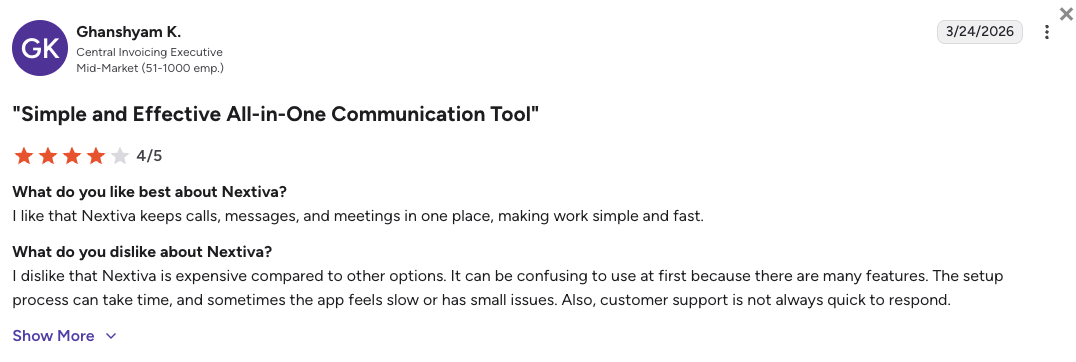
Nextiva users praise the omnichannel setup and support quality, which consistently scores above category average on G2. The most common complaint is the price jump from Core to Engage to access meaningful features like call recording and CRM integrations, and the regulatory fees that aren’t always visible during initial pricing research.
How Do G2 Users Rate Nextiva?
Nextiva holds a 4.5/5 rating on G2, based on 3,400+ verified reviews.
5. Quo (formerly OpenPhone): Best for Mobile-First Teams and Fast Setup
What Is Quo (formerly OpenPhone)?
Quo, formerly known as OpenPhone, is a mobile-first business phone app built for small teams that share phone numbers and run most of their business from a smartphone. It’s known for its clean, intuitive interface and fast setup, with most teams live within 30 minutes.
At $15/user/mo (Starter, annual), Quo is priced below Ooma’s Pro plan. It includes shared inboxes, HubSpot and Salesforce integrations, and an AI receptionist called Sona. Its main limitation: it’s built for small, collaborative teams, typically under 25 agents, and doesn’t scale well into complex contact center territory.
Why Is Quo a Strong Ooma Competitor?
-
Shared phone number inbox for team collaborationQuo lets multiple team members share a single business number, with full conversation history visible to the whole team. Ooma doesn’t offer shared inboxes at any tier.
-
HubSpot and Salesforce integrations from $15/user/moQuo includes CRM integrations at the same price as Nextiva’s Core plan. On Ooma, you’d need to pay $29.95 (Pro Plus) for the same capability.
-
Sona AI receptionist for after-hours coverageQuo’s built-in Sona AI handles after-hours calls automatically. Ooma has no native AI features, meaning after-hours calls either go to voicemail or require manual scheduling.
What Are the Pros & Cons of Quo?
| Pros | Cons |
|---|---|
| Shared inboxes, great for small collaborative teams | Not built for large contact centers, no complex queue routing |
| HubSpot and Salesforce integrations from $15/user/mo | Limited global calling outside North America |
| Sona AI receptionist built in, no add-on needed | Outgrows quickly for teams over 25 agents |
What Are Quo’s Plans & Pricing?
Quo pricing starts at $15/user/month (billed annually), with the following plans:
Quo (formerly OpenPhone) Pricing Plans
| Plan | Price (annual billing) | Key Features |
|---|---|---|
| Starter | $15/user/mo | Shared inboxes, HubSpot + Salesforce integrations, calling, SMS, Sona AI |
| Business | $23/user/mo | Everything in Starter + advanced analytics, additional integrations, priority support |
| Scale | Custom pricing | Everything in Business + dedicated onboarding, custom integrations, SSO |
Quo Works Best for Teams Under 25 Agents
Quo is an excellent fit for small, collaborative teams. Once your contact center grows past 20 to 25 agents, you’ll hit the ceiling on routing complexity, reporting depth, and outbound calling capabilities. That’s when a platform like CloudTalk becomes the more practical long-term investment.
What Are Quo’s Customers Saying?
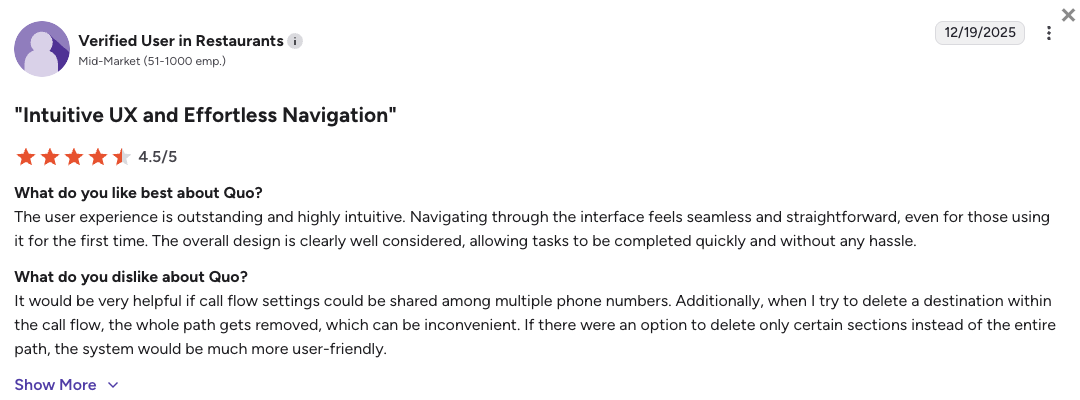
Quo users consistently praise the clean interface and the shared inbox experience, which is genuinely useful for small teams managing calls together. The main criticism is that it outgrows its usefulness quickly for teams needing contact center features like queue management, advanced routing, or outbound dialing sequences.
How Do G2 Users Rate Quo?
Quo holds a 4.7/5 rating on G2, based on 3,000+ verified reviews, the highest rating on this list.
6. Vonage: Best for API-Customizable Systems for Tech-Savvy Teams
What Is Vonage?
Vonage, now part of Ericsson, is a VoIP and communications platform that sits at the intersection of business phone systems and developer APIs. Its Communications Platform as a Service (CPaaS) layer lets engineering teams build custom call flows, IVR logic, and messaging workflows directly into their own products.
For non-technical teams, Vonage Business Communications (VBC) starts at $13.99/line/mo and covers standard business calling. For teams with in-house developers, the Vonage API platform is the main draw: it’s one of the most powerful in the category. As an Ooma alternative, Vonage wins on integration flexibility but loses on simplicity and pricing transparency.
Why Is Vonage a Strong Alternative to Ooma?
-
Developer API for custom call flows and integrationsVonage’s CPaaS API lets developers build exactly the call routing and integration logic their business needs. If your team has developers, this is far more powerful than Ooma’s closed system.
-
CRM integrations available on Mobile plan and aboveVonage includes Salesforce, HubSpot, and Zoho integrations. Ooma requires its most expensive Pro Plus tier ($29.95/user/mo) for any CRM integration.
-
99.999% uptime SLA on Premium plansVonage’s Premium tier includes a five-nines uptime SLA. Ooma doesn’t publish an uptime SLA at any tier, which matters for businesses where phone downtime has a direct revenue impact.
What Are the Pros & Cons of Vonage?
| Pros | Cons |
|---|---|
| Powerful CPaaS API for custom integration | Pricing not fully transparent, many features are add-ons |
| CRM integrations available below Ooma’s top tier | Complex for non-technical teams to configure and maintain |
| 99.999% uptime SLA on Premium and above | No free trial for standard business plans |
What Are Vonage’s Plans & Pricing?
Vonage pricing starts at $13.99/line/month (billed annually), with the following plans:
Vonage Business Communications Pricing Plans
| Plan | Price (annual billing) | Key Features |
|---|---|---|
| Mobile | $13.99/line/mo | Unlimited calling and SMS, mobile and desktop apps, basic CRM integrations |
| Premium | $20.99/line/mo | Everything in Mobile + video meetings (up to 200 participants), 99.999% SLA, full CRM integrations |
| Advanced | $39.99/line/mo | Everything in Premium + call recording, voicemail transcription, on-demand call groups |
Call Recording Costs $39.99 on Vonage Too
Just like Ooma, Vonage locks call recording behind its top tier. Call recording requires the Advanced plan at $39.99/line/mo. That’s $10 more per user than Ooma Pro Plus, which is already one of Ooma’s main pain points. CloudTalk includes call recording from the Starter plan at $25/user/mo.
What Are Vonage’s Customers Saying?
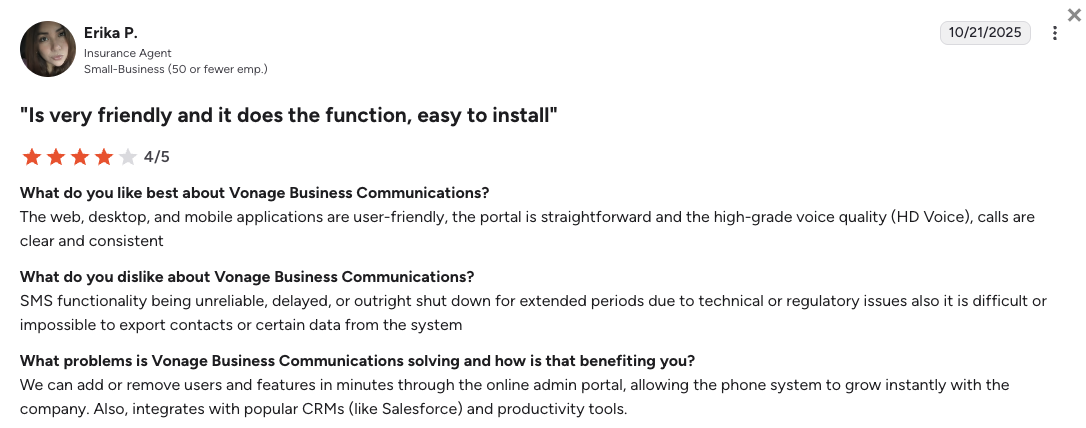
Vonage users appreciate the API depth and the CRM integration quality when properly configured. The most common frustrations center on pricing opacity, where the advertised price rarely reflects the final invoice once add-ons and regulatory fees are included, and on the complexity of initial setup for non-technical teams.
How Do G2 Users Rate Vonage?
Vonage Business Communications holds a 4.3/5 rating on G2, based on 500+ verified reviews.
7. RingCentral: Best for Mid-Market Teams Needing Enterprise-Grade Unified Comms
What Is RingCentral?
RingCentral is one of the most established unified communications platforms (UCaaS) on the market. It combines VoIP calling, video meetings, team messaging, and fax under a single platform designed primarily for mid-market and enterprise teams.
Starting at $20/user/mo (Core, annual), RingCentral costs more than most alternatives on this list but includes more out of the box: video meetings, team messaging, and an AI writing assistant are all included from the entry tier. It’s a strong Ooma alternative for teams that have outgrown basic VoIP and need a full unified communications stack.
Why Is RingCentral a Strong Ooma Competitor?
-
Video meetings and team messaging included from CoreRingCentral bundles video meetings (up to 100 participants) and team messaging into its Core plan at $20/user/mo. Ooma charges $29.95 (Pro Plus) just to unlock video. For teams replacing both a phone system and a video tool, RingCentral’s bundle can save money overall.
-
300+ app integrations including Salesforce from AdvancedRingCentral Advanced ($25/user/mo) includes Salesforce and 300+ business app integrations. Ooma locks any CRM integration behind its $29.95 top tier.
-
RingSense AI with call summaries and coaching on AdvancedRingCentral’s RingSense AI provides automatic call summaries, action item extraction, and sales coaching insights. Ooma has no AI features at any tier. RingCentral also offers its own AI receptionist.
What Are the Pros & Cons of RingCentral?
| Pros | Cons |
|---|---|
| Video + messaging + calling in one platform from $20/user/mo | Higher entry price than most alternatives on this list |
| 300+ app integrations on Advanced and Ultra | RingSense AI sold separately, not bundled into base plans |
| Widely deployed: large admin and IT community for support | Interface can feel complex for very small teams |
What Are RingCentral’s Plans & Pricing?
RingCentral pricing starts at $20/user/month (billed annually), with the following plans:
RingCentral Pricing Plans
| Plan | Price (annual billing) | Key Features |
|---|---|---|
| Core | $20/user/mo | Unlimited calling, video meetings (100 participants), team messaging, IVR, AI writing assistant |
| Advanced | $25/user/mo | Everything in Core + call recording, 300+ integrations (including Salesforce), auto call notes |
| Ultra | $35/user/mo | Everything in Advanced + unlimited file storage, device analytics, enhanced reporting |
RingCentral's Best Use Case
RingCentral makes the most sense for mid-market teams (50+ seats) that need a single vendor for calling, video, and messaging, and have an IT team to manage the setup. For teams under 30 seats replacing Ooma for basic calling and CRM sync, CloudTalk delivers the same essentials at a lower total cost and with less administrative complexity.
What Are RingCentral’s Customers Saying?
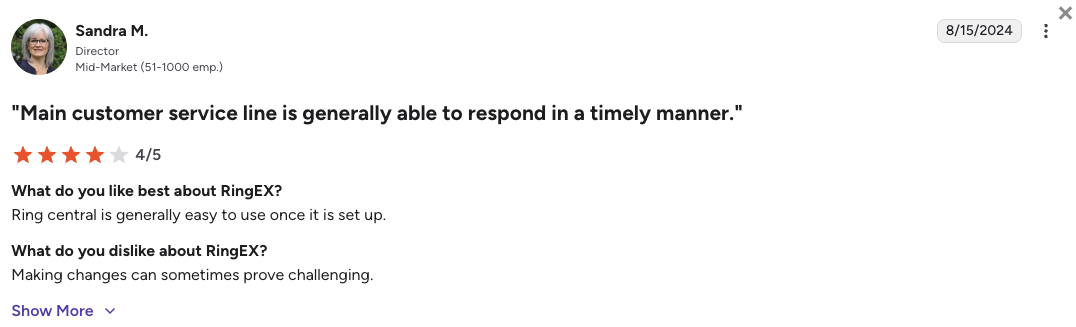
RingCentral users value the all-in-one reliability and the breadth of integrations. The most consistent complaints are around pricing complexity, where features that sound bundled often require a separate add-on, and around customer support response times, which users on G2 rate as average compared to competitors like Nextiva.
How Do G2 Users Rate RingCentral?
RingCentral holds a 4.2/5 rating on G2 (for its RingEx suite), based on 1,300+ verified reviews.
8. Dialpad: Best AI-First Business Phone System
What Is Dialpad?
Dialpad is an AI-powered business communications platform that has built real-time transcription, call summaries, and live coaching directly into its phone system at all tiers. Unlike most competitors that bolt AI features onto their existing platform, Dialpad built around AI from the start.
Starting at $15/user/mo (Standard), Dialpad includes built-in AI that transcribes calls in real time, surfaces action items automatically, and coaches agents during live calls. For teams that want AI-first capabilities and more transparency than Ooma’s opaque tier structure, Dialpad is a compelling choice.
Why Is Dialpad a Strong Alternative to Ooma?
-
Real-time AI transcription and summaries on all plansDialpad transcribes every call in real time and generates automatic call summaries with action items. This is included from the Standard plan at $15/user/mo. Ooma has no AI features at any tier.
-
Live coaching for sales teamsDialpad’s Ai Sales add-on surfaces battlecards and suggested responses during live sales calls. It’s one of the few business phone tools with in-call coaching at this price point.
-
Multi-channel support: calls, SMS, video, AI chatDialpad covers voice, SMS, video meetings (up to 150 participants), and AI-assisted chat in a single app. Ooma is voice-only at all tiers.
What Are the Pros & Cons of Dialpad?
| Pros | Cons |
|---|---|
| Real-time AI transcription and call summaries on all plans | Call recording locked behind Pro ($25/user/mo) for most users |
| Live coaching for sales teams via Ai Sales add-on | Dialpad Meetings is a separate product, not bundled |
| Clean, modern interface; fast onboarding | Customer support rated average, mostly chat and email tickets |
What Are Dialpad’s Plans & Pricing?
Dialpad pricing starts at $15/user/month (billed annually), with the following plans:
Dialpad Pricing Plans
| Plan | Price (annual billing) | Key Features |
|---|---|---|
| Standard | $15/user/mo | Unlimited calling, AI transcription, AI call summaries, SMS, voicemail |
| Pro | $25/user/mo | Everything in Standard + call recording, CRM integrations (Salesforce, HubSpot), international numbers |
| Enterprise | Custom pricing | Everything in Pro + custom retention, priority support, SSO, SLA guarantees |
Dialpad's AI Features vs. CloudTalk's AI Receptionist
Dialpad includes real-time transcription from Standard. CloudTalk includes 50 free AI Receptionist minutes pre-loaded on every plan, with an AI voice agent option available from $349/mo. The main difference: Dialpad is strong on real-time coaching during live calls, while CloudTalk’s AI Receptionist handles inbound calls independently after hours. Your best fit depends on whether your AI priority is coaching your team or covering calls automatically.
What Are Dialpad’s Customers Saying?
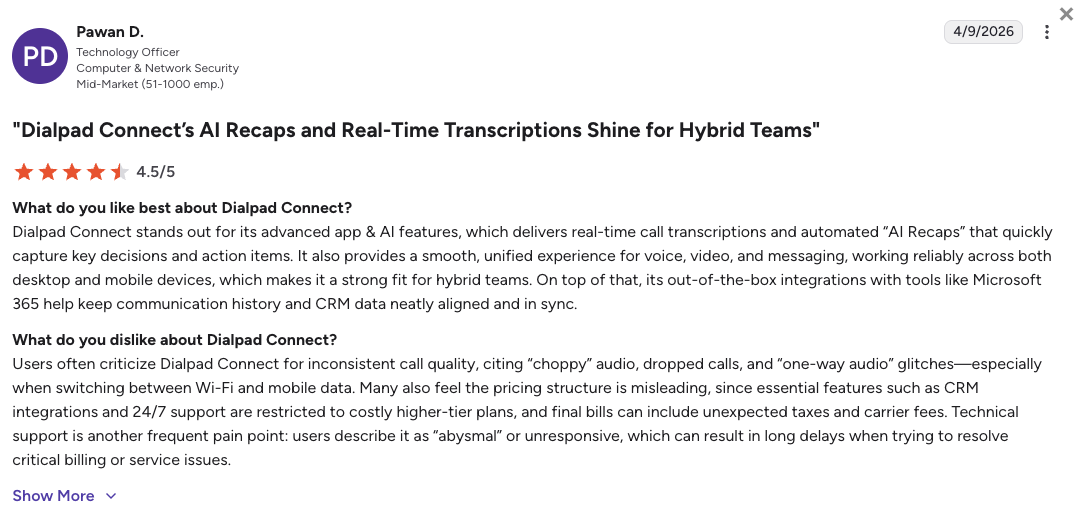
Dialpad users consistently highlight the AI transcription quality, calling it more accurate than competing tools, and the clean interface. The most common complaints relate to call recording being locked behind the Pro plan and the support team being slow to resolve technical issues compared to the onboarding experience.
How Do G2 Users Rate Dialpad?
Dialpad holds a 4.4/5 rating on G2, based on 4,000+ verified reviews.
9. Grasshopper: Best for Solopreneurs and Micro-Businesses
What Is Grasshopper?
Grasshopper is a virtual phone system built around flat-rate pricing for solopreneurs and micro-businesses. Unlike seat-based VoIP tools, Grasshopper charges per account rather than per user, which makes it predictable and affordable for businesses where one or two people handle all their own calls.
The True Solo plan starts at $14/mo (annual) for 1 user with 1 number and 1 extension. The Solo Plus plan at $25/mo extends this to unlimited extensions and users. For a sole trader or a 2-person business currently on Ooma Essentials ($19.95/user/mo), Grasshopper can be meaningfully cheaper.
Why Is Grasshopper a Strong Ooma Competitor?
-
Flat-rate pricing regardless of team sizeGrasshopper’s Solo Plus plan ($25/mo) gives unlimited users and extensions for one flat monthly fee. For teams of 2 to 5 people, this is significantly cheaper than Ooma’s per-seat model at $19.95/user/mo.
-
Instant response feature for missed callsGrasshopper automatically sends a text to callers you missed, letting them know you’ll get back to them. It’s a simple feature Ooma doesn’t offer and it’s immediately useful for solopreneurs who can’t always answer.
-
Works on any existing mobile device, no new hardwareGrasshopper routes calls through your existing phone number on iOS or Android. No hardware purchase, no new app account needed beyond setup. It keeps operational overhead minimal.
What Are the Pros & Cons of Grasshopper?
| Pros | Cons |
|---|---|
| Flat-rate pricing: unlimited users from $25/mo | No CRM integrations at any tier |
| Instant response texts for missed calls | No call recording, no analytics, no AI features |
| No hardware required, works on existing smartphones | Not designed for teams over 10 people |
What Are Grasshopper’s Plans & Pricing?
Grasshopper pricing starts at $14/month (flat rate, billed annually), with the following plans:
Grasshopper Pricing Plans
| Plan | Price (annual billing) | Key Features |
|---|---|---|
| True Solo | $14/mo (flat) | 1 user, 1 number, 1 extension, calling and SMS, instant response texts |
| Solo Plus | $25/mo (flat) | Unlimited users, 1 number, unlimited extensions, all True Solo features |
| Small Business | $55/mo (flat) | Unlimited users, 5 numbers, unlimited extensions, all Solo Plus features |
Grasshopper Is Great Until You Need to Grow
Grasshopper works perfectly for businesses where the owner handles most customer calls personally. The moment your team grows past 5 to 10 people and you need call queues, CRM sync, or analytics, you’ll need to migrate to a more capable platform. Plan your migration before you hit those limits rather than after.
What Are Grasshopper’s Customers Saying?
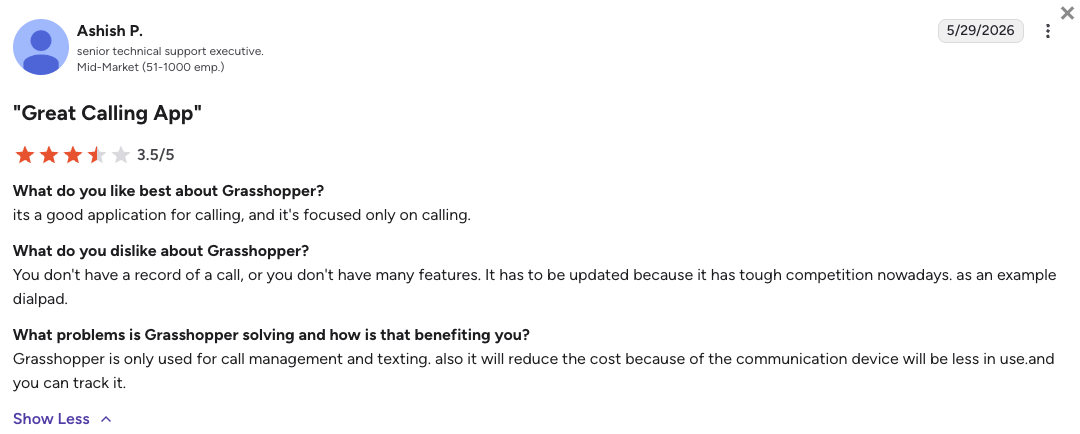
Grasshopper users love the flat-rate pricing and the simplicity of setup. The consistent complaint is feature ceiling: once a small business starts growing, the lack of CRM integrations, call recording, and analytics means migrating to a new platform. Many G2 reviewers note they outgrew Grasshopper within 12 to 18 months.
How Do G2 Users Rate Grasshopper?
Grasshopper holds a 3.9/5 rating on G2, based on 150+ verified reviews, the lowest on this list, reflecting its limited feature ceiling for growing businesses.
10. GoTo Connect: Best for SMBs Wanting Bundled Voice, Video, and Meetings
What Is GoTo Connect?
GoTo Connect is the unified communications platform from GoTo (formerly LogMeIn). It bundles voice calling, video meetings, and team messaging in a single platform with a visual drag-and-drop dial plan editor that makes complex call routing accessible to non-technical admins.
Starting at $26/user/mo (Phone System, annual), GoTo Connect is priced higher than most alternatives at the entry level. Its main differentiator is the visual dial plan editor and the bundled GoTo Meeting video platform, which Ooma users currently paying for video separately may find simplifies their billing.
Why Is GoTo Connect a Strong Alternative to Ooma?
-
Visual drag-and-drop dial plan editor for non-technical adminsGoTo Connect’s dial plan editor lets admins build complex IVR and routing logic without touching a line of code. Ooma’s IVR is more limited and requires support assistance for complex configurations.
-
GoTo Meeting video bundled, no extra licenseGoTo Connect bundles GoTo Meeting for video calls. Teams replacing Ooma who currently pay separately for a video tool can potentially consolidate those bills.
-
Unlimited calling in 50+ countries on Connect planGoTo Connect’s Connect plan ($34/user/mo) includes unlimited calling in 50+ countries. Ooma covers US, Canada, Mexico, and Puerto Rico only, with international calls billed per minute.
What Are the Pros & Cons of GoTo Connect?
| Pros | Cons |
|---|---|
| Visual drag-and-drop dial plan editor | Higher entry price than most alternatives at $26/user/mo |
| GoTo Meeting video bundled, simplifies billing | CRM integrations require the Connect plan ($34/user/mo) or higher |
| Unlimited calling in 50+ countries on Connect plan | No AI features at any tier |
What Are GoTo Connect’s Plans & Pricing?
GoTo Connect pricing starts at $26/user/month (billed annually), with the following plans:
GoTo Connect Pricing Plans
| Plan | Price (annual billing) | Key Features |
|---|---|---|
| Phone System | $26/user/mo | Unlimited domestic calling, IVR, visual dial plan editor, GoTo Meeting included, call recording |
| Connect | $34/user/mo | Everything in Phone System + unlimited calling in 50+ countries, CRM integrations, advanced reporting |
| Contact Center | Custom pricing | Everything in Connect + full contact center suite, workforce management, custom analytics |
GoTo Connect Includes Call Recording from the Entry Plan
Unlike Ooma, Vonage, and Google Voice, GoTo Connect includes call recording on its Phone System plan at $26/user/mo. That’s the entry tier. It’s one of the few tools on this list where you don’t need to upgrade just to record calls.
What Are GoTo Connect’s Customers Saying?
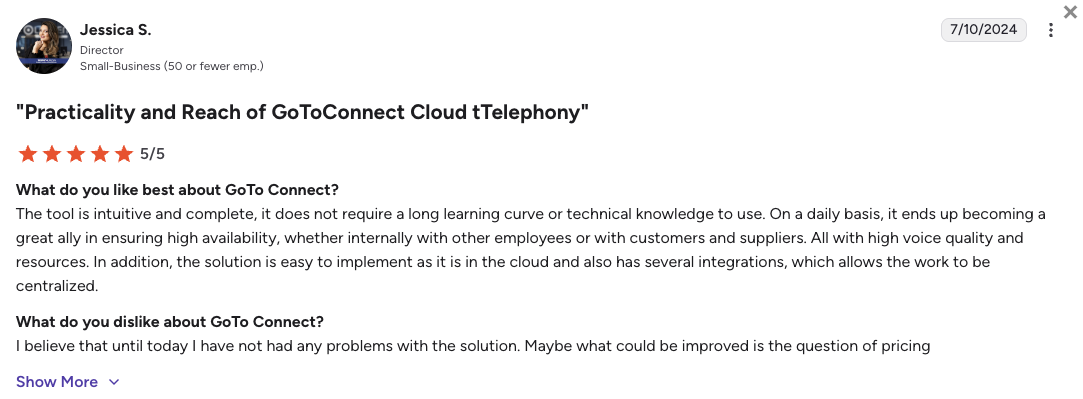
GoTo Connect users praise the dial plan editor as genuinely useful for non-technical office managers who need to build routing logic without IT involvement. The most frequent complaints center on the higher starting price and the customer support experience, where ticket resolution times are slower than competitors like CloudTalk and Nextiva.
How Do G2 Users Rate GoTo Connect?
GoTo Connect holds a 4.4/5 rating on G2, based on 1,400+ verified reviews.
What Real Users Are Saying about Ooma and Its Alternatives
Pricing pages and vendor websites tell you what a tool does. Real users tell you whether it actually works the way it claims. We reviewed hundreds of posts across Reddit, Quora, and G2 to surface what genuine Ooma users are experiencing in 2026, and what they switched to when Ooma stopped working for them.
What Redditors Are Saying about Ooma Alternatives
We reviewed threads from r/SaaS and r/ooma, where small business owners and IT administrators discuss their real-world phone system experiences. Three threads stood out as most relevant to teams actively researching Ooma alternatives.
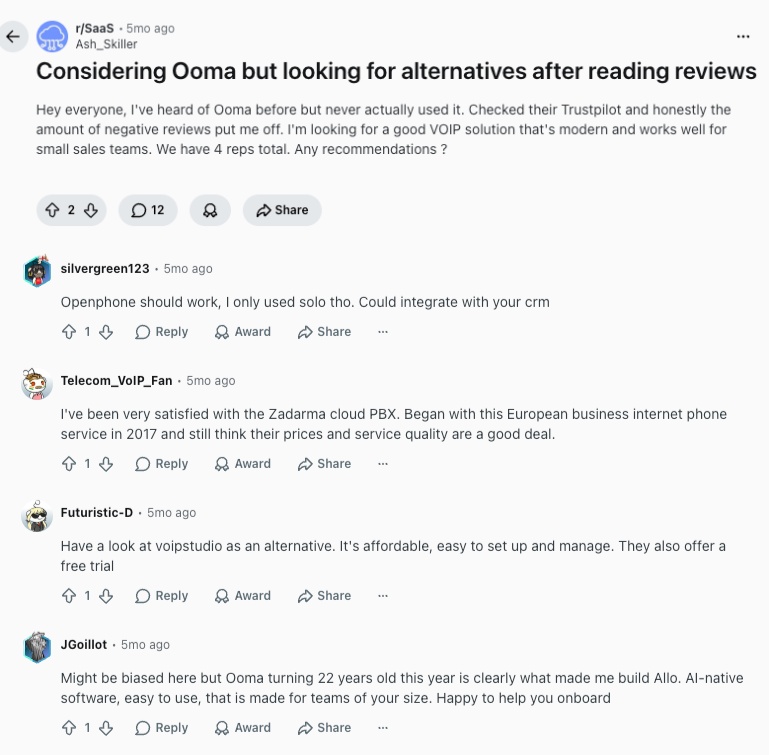
- Best Ooma alternative for growing businesses: In r/SaaS, users considering Ooma received consistent responses pointing them toward Allo, Zadarma, and OpenPhone (now Quo) as better fits for businesses expecting to grow. The main criticism was the locked CRM tier and the lack of a free trial before committing. Based on what unsatisfied Ooma users are looking for, CloudTalk also stands as a great alternative for scaling teams.
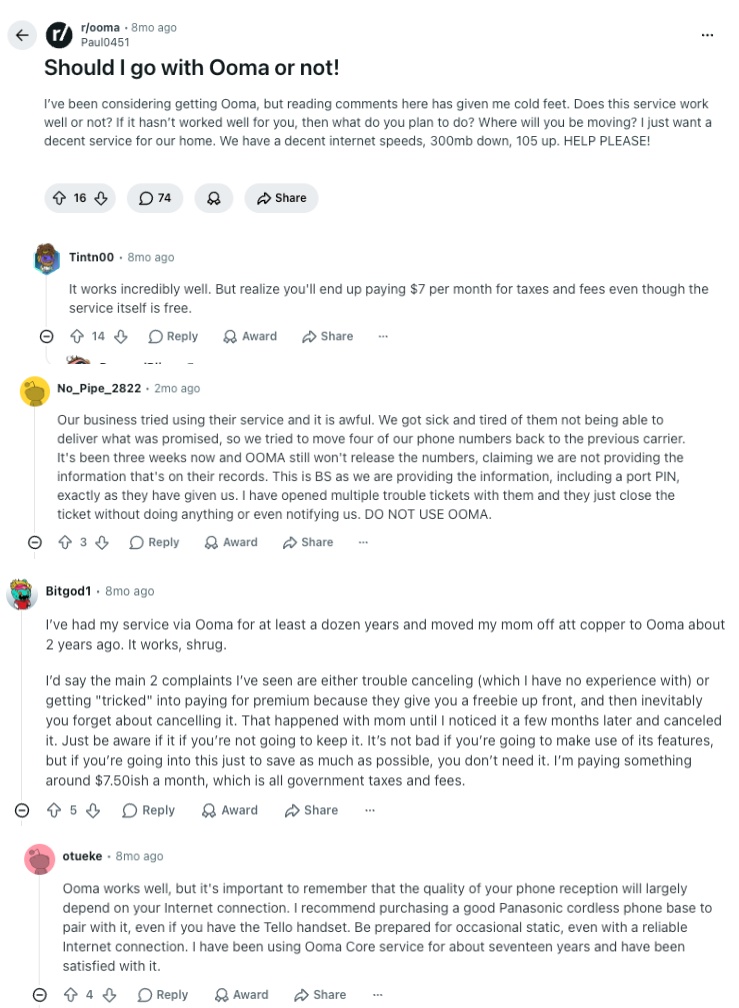
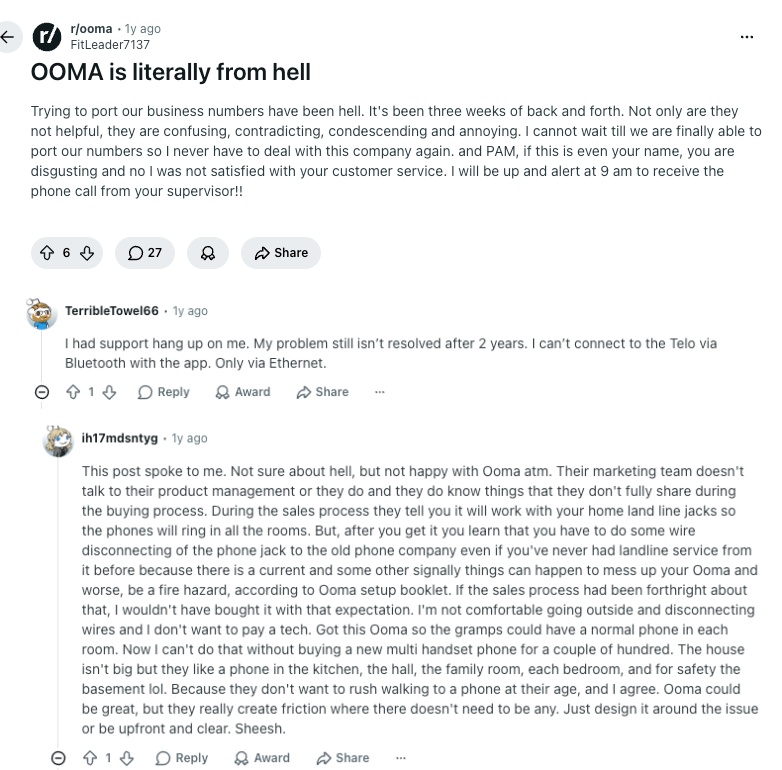
- Ooma mobile app reliability: In r/ooma, a thread titled “Should I go with Ooma or not?” drew replies from multiple active Ooma subscribers. The consensus was that Ooma works fine for very small US-based businesses, but iPhone CallKit failures were a recurring complaint, causing dropped and silently missed calls.
- Ooma support and billing complaints: A viral r/ooma post, “Ooma is literally from hell,” described escalating support failures over 3 weeks. The post attracted replies from others sharing similar experiences with billing disputes and number porting delays, and it generated significant community discussion about switching to alternatives.
What Quora Users Are Asking about Ooma Alternatives
On Quora, questions about Ooma and its alternatives tend to come from consumers and small business owners researching home phone replacements and business VoIP options. Three questions were especially relevant to understanding how buyers approach this decision.
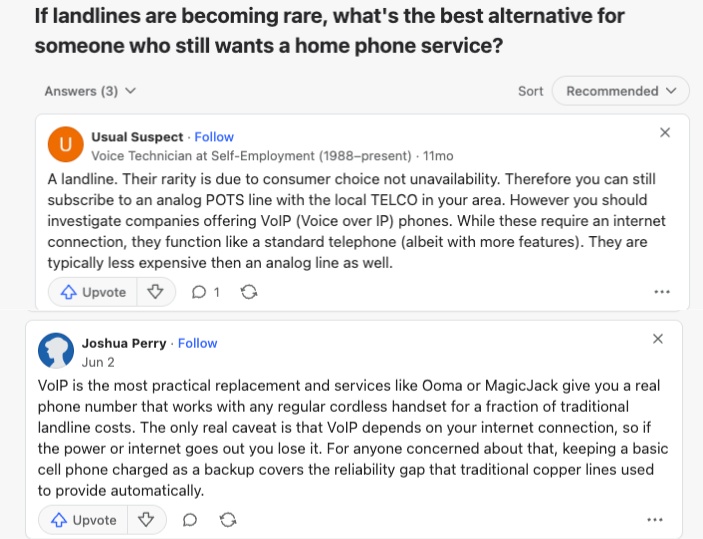
- Best landline alternative for home and small business: A question on whether landline alternatives like Ooma are the best option drew answers consistently recommending VoIP platforms. Ooma, and MagicJack were cited most often for home use. From many other threads, it’s apparent that for business-grade needs, many users push toward CloudTalk and RingCentral.
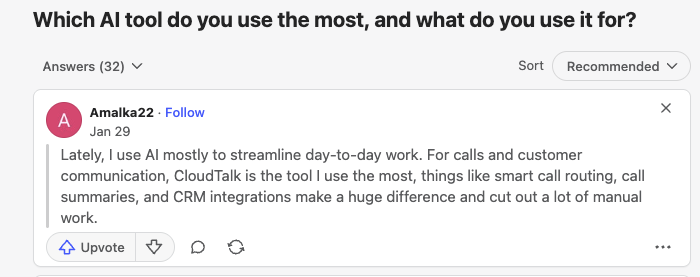
- Ooma vs. CloudTalk for AI-powered call handling: In a broader discussion on AI tools, several respondents mentioned CloudTalk’s AI voice solutions as a key reason for switching from Ooma, specifically for after-hours call handling. Ooma has no native AI features at any tier.
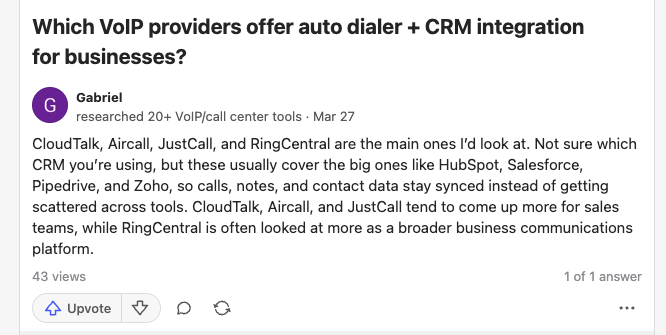
- Best VoIP with auto-dialer and CRM integration: A question about VoIP providers with auto-dialer and CRM features drew detailed answers pointing to CloudTalk, Dialpad, and RingCentral as the strongest options. The consensus was clear: Ooma is not suited for sales teams that need outbound dialing tools or CRM sync below the Pro Plus tier.
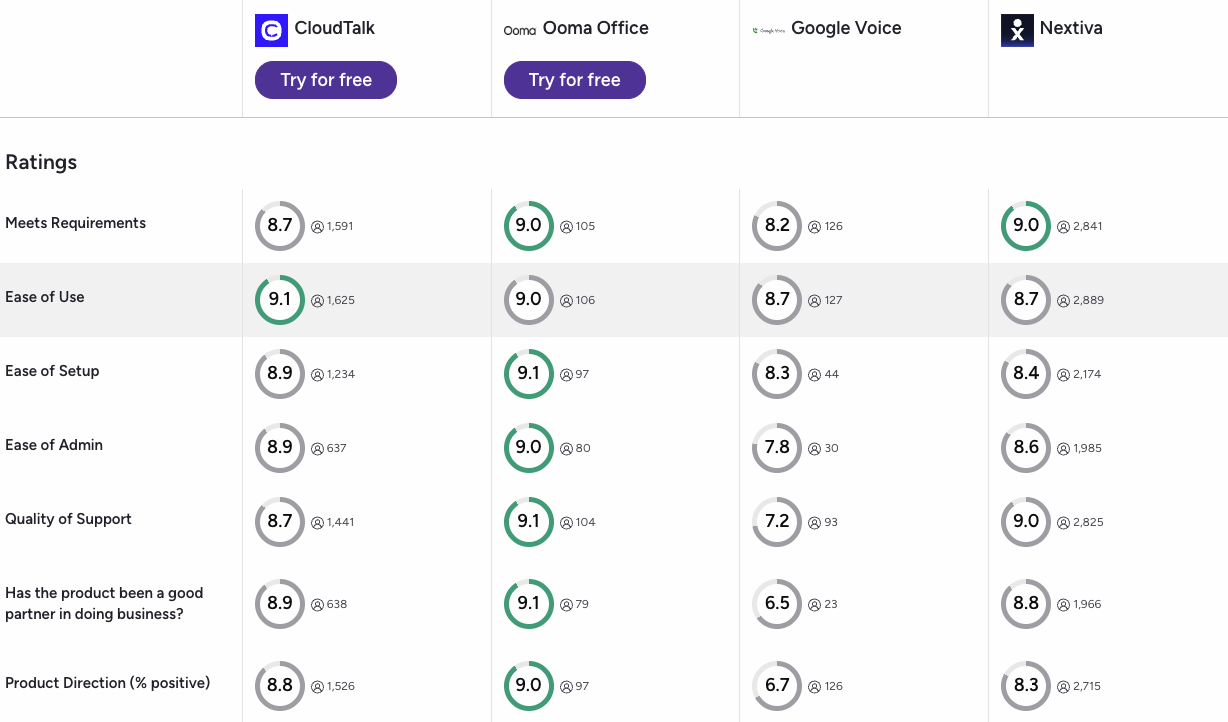
How CloudTalk, Ooma, Google Voice, and Nextiva Compare on G2
G2’s comparison tool lets you view verified reviews for multiple platforms side by side. Here’s what the data shows when you compare CloudTalk, Ooma, Google Voice, and Nextiva directly.
- Setup, support, and ease of doing business: CloudTalk outscores Ooma on ease of setup, quality of support, and ease of doing business across G2’s verified review criteria, based on side-by-side comparison data.
- Support responsiveness vs. feature-to-price value: Nextiva leads on support responsiveness in G2’s comparison, though CloudTalk scores comparably on feature-to-price value, making it the stronger pick for teams prioritizing what they get for what they pay.
- Integration depth: Google Voice scores lowest on G2 for integration depth across all four platforms, reflecting its limited CRM ecosystem outside of Google Workspace tools.
CloudTalk vs. Ooma: Final Head-to-Head Comparison
After testing both platforms against the criteria that matter most to growing SMB teams, here’s how CloudTalk and Ooma compare feature by feature. This table uses verified pricing and publicly confirmed feature availability as of 2026.
CloudTalk vs. Ooma: Feature-by-Feature Comparison
| Feature | CloudTalk | Ooma | Winner |
|---|---|---|---|
| Entry Price (annual) | $19/user/mo | $19.95/user/mo | CloudTalk |
| Free Trial | 14 days, no credit card | 30-day money-back (credit card required) | CloudTalk |
| Call Recording | From Lite ($19/user/mo) | Pro only ($24.95/user/mo) | CloudTalk |
| CRM Integrations | 100+ tools from Essential ($29/user/mo) | Pro Plus only ($29.95/user/mo) | CloudTalk |
| AI Features | AI Receptionist (50 free minutes on all plans) | None | CloudTalk |
| Power Dialer | Expert plan ($49/user/mo) or as a $15/mo add-on on other tiers | Not available at any tier | CloudTalk |
| Country Coverage | 180 countries | US, Canada, Mexico, Puerto Rico | CloudTalk |
| Mobile App Reliability | Stable on iOS and Android | Known CallKit failures on iPhone | CloudTalk |
| Video Meetings | Requires a separate tool | Pro Plus only ($29.95/user/mo) | Tie |
| Hardware Phone Support | Select IP phones supported | Broad hardware compatibility | Ooma |
| G2 Rating | 4.4/5 (1,800+ reviews) | 4.5/5 (130+ reviews) | Tie |
| 24/7 Customer Support | Included on all plans (phone on Expert) | Limited hours | CloudTalk |
When Ooma Wins
Ooma is the better choice for one specific scenario: a very small business (1 to 5 people) based in the US, Canada, or Mexico that needs a simple phone system with broad hardware compatibility and no plans to use CRM software or scale past 20 seats. Outside that scenario, CloudTalk delivers more features at a lower or comparable per-user cost once you factor in what Ooma locks behind paid tiers.
How to Choose the Right Ooma Alternative for Your Business
Not every Ooma alternative on this list is right for every team. Your best choice depends on your team size, the tools you already use, your geographic footprint, and how important AI features and outbound calling are to your workflow. Use this guide to narrow down the shortlist before starting a trial.
What’s Better Than Ooma for Growing Sales Teams?
CloudTalk is the strongest Ooma alternative for growing sales teams. It includes a Power Dialer (Expert plan), 100+ CRM integrations from the Essential plan, call recording from Starter, and an AI Receptionist on all plans. Dialpad is a close second if real-time AI transcription and live call coaching are priorities. Both platforms offer free trials and transparent pricing with no credit card required to start.
Which Ooma Alternative Is Best for Small Businesses Under 10 People?
For very small teams (under 10 people) replacing Ooma to save money, or teams looking for Ooma alternatives in Canada, Grasshopper’s Solo Plus plan ($25/mo flat rate) is the most cost-efficient option if CRM integrations aren’t needed. Quo (formerly OpenPhone) is the best choice for small teams that need CRM sync and shared inboxes at $15/user/mo. Google Voice is a strong option only if the team is already inside Google Workspace and doesn’t need Salesforce or HubSpot.
What Is the Best Free Alternative to Ooma?
There is no fully free business alternative to Ooma, but several tools offer meaningful free trials. CloudTalk offers a free 14-day trial with no credit card required. Zoom Phone, Google Voice, and Nextiva also offer trials. Google Voice has a free personal plan, but it doesn’t include business features like CRM integrations, auto-attendants, or call recording without a Google Workspace subscription.
Which Ooma Alternative Has the Best CRM Integration?
When considering Ooma alternatives, CRM depth should be one of your deciding factors. CloudTalk has the deepest CRM integration coverage on this list, with 100+ native integrations including HubSpot, Zendesk, Pipedrive, Freshdesk, and Salesforce (Expert plan). RingCentral covers 300+ integrations on its Advanced plan at $25/user/mo. Dialpad includes Salesforce and HubSpot from its Pro plan at $25/user/mo. All three outperform Ooma, which requires its top-tier Pro Plus plan ($29.95/user/mo) for any CRM integration.
Which Mobile VoIP Is the Best Alternative to Ooma?
For teams that work primarily from mobile devices, Quo (formerly OpenPhone) leads for simplicity and shared inboxes. CloudTalk’s mobile app is also very reliable on iOS and Android and includes full access to all features including call recording and CRM sync. Ooma’s iOS app has documented CallKit integration failures that cause dropped calls and silent missed calls, which is a meaningful disadvantage for mobile-first teams.
What Should I Look for When Switching from Ooma?
When evaluating Ooma alternatives, check four things before committing: whether call recording is included on your target plan or locked behind an upgrade; whether the CRM you use is supported natively; whether international calling costs are transparent and affordable for your geographic footprint; and whether there’s a free trial with no credit card required so you can test with real calls before paying. Every platform on this list scores better than Ooma on at least one of those four criteria.
What’s the Best Ooma Alternative for Growing Businesses?
CloudTalk is the best Ooma alternative for growing businesses. It solves every structural limitation Ooma creates for scaling teams: call recording is available from the Starter plan, not locked behind a mid-tier upgrade; 100+ CRM integrations are included from Essential; an AI Receptionist with 50 free minutes ships on every account; and virtual numbers are available in 180 countries. Pricing scales predictably per seat with no hidden regulatory fees. You can test the full platform for 14 days with no credit card required, then choose a plan based on what your team actually used during the trial, not what a sales rep recommended.
Ready to Replace Ooma? Start with CloudTalk.
Ready to Make the Switch from Ooma?
Ooma is a legitimate business phone system for very small US-based teams with basic needs. But if you’re looking for an Ooma replacement that scales with your team, the limitations add up fast: call recording locked to Pro, CRM integrations locked to Pro Plus, no free trial, and no annual discount.
Every platform on this list fixes at least one of Ooma’s core limitations. CloudTalk fixes all of them: call recording from Starter, 100+ CRM integrations from Essential, AI Receptionist on all plans, and coverage in 180 countries, all with transparent per-user pricing and a free 14-day trial.
-
Call recording from Starter, no upgrade requiredStop paying Pro-tier prices just to record your own calls. Record all of your interactions automatically with just the base plan.
-
100+ CRM integrations from EssentialYour phone system syncs with all major CRM and helpdesk tools like HubSpot or Zendesk automatically. No manual data entry after every call.
-
Multilingual AI Receptionist with 50 free minutes on every planBasic triage, appointment booking, and after-hours calls handled in 60+ languages, automatically, from day one.
-
180 countries, 160+ national number typesBuy local virtual numbers wherever your customers are. Build trust and win more deals even from anywhere.
-
Free 14-day trial with no credit card requiredTest the full platform for 14 before paying a cent. Or book a demo and learn what else CloudTalk gives you that Ooma can’t.
See Why 4,000+ Teams Are Switching from Ooma to CloudTalk
Frequently Asked Questions about Ooma Alternatives
Answers to the most common questions about Ooma alternatives, pricing, and switching to a better business phone system in 2026.