
Greenhouse Phone System Integration
Call Center for Greenhouse
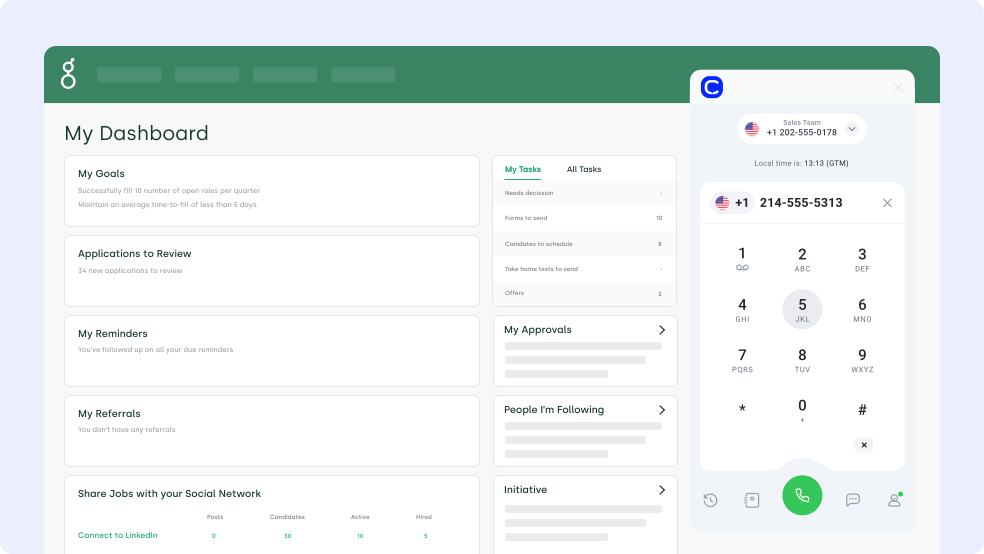
Combine the strength of your applicant tracking system and powerful calling features with CloudTalk’s Greenhouse VoIP Integration. Make and receive calls, send SMS messages, and eliminate manual work with real-time call logging and 2-way data synchronization. This powerful integration is launching soon alongside other exciting ones. Stay tuned!

Made by

CloudTalk
Category
Recruiting
HR Tech
Used for
Candidate Communication
Interview Coordination
Workflow Automation
Recruiter Productivity
Users
Talent Acquisition Teams
Recruiters
Hiring Managers
Trusted by Thousands

1,480 Reviews on G2
1200
Companies across the world
82%
Increase of call volume
23%
Less missed calls
1326€
Save per year
Why Integrate CloudTalk with Greenhouse?
Enhance your recruitment workflows with the Greenhouse Phone System Integration by CloudTalk. Automatically log calls, SMS, and voicemails into the right candidate profiles—no manual entry needed. Recruiters gain instant access to full interaction histories, helping them stay organized and responsive throughout the hiring process.
With real-time data, call recordings, and AI-powered summaries, CloudTalk keeps your hiring team focused on what matters: building strong candidate relationships.
What Is Greenhouse?
Greenhouse is a leading applicant tracking system designed to help companies streamline hiring. It offers structured recruiting tools, from job posting to interview coordination, empowering teams to make faster, data-driven hiring decisions.
What Data Do Greenhouse & CloudTalk Share?

Greenhouse

CloudTalk
CloudTalk Processes
Workflow Actions:
Automate call logging, initiating calls, and sending SMS messages.

Workflow Actions
Greenhouse & CloudTalk Exchange
Contact Information:
Sync names, emails, phone numbers, and lead details between systems.

Greenhouse Receives
Call Data:
Missed and answered calls, durations, caller and receiver numbers, and call recording links.

Call Data
SMS Data:
All inbound and outbound SMS messages sent via CloudTalk are logged in Greenhouse under the candidate’s activity history and linked to their primary job listing.
SMS Logs
How to Integrate Greenhouse with CloudTalk?
- Make sure you have a CloudTalk Essential plan and admin rights in both CloudTalk and Greenhouse.
- Log into your CloudTalk Dashboard.
- In the left-hand menu, go to Settings → Integrations.
- Find Greenhouse in the list of available integrations and click Add Integration.
- Under Workflow Settings, click New Authentication.
- Generate your API Key in Greenhouse:
– Go to Dev Center → API Credentials → Create new API Credentials - Back in CloudTalk, enter:
– Your Authentication Name
– Your Greenhouse subdomain
– The API Key you just generated - Configure your integration settings:
– Add a caption (label for the integration)
– Set up contact tagging
– Assign CloudTalk numbers for calls, SMS, or both - Click Submit to finalize the setup and begin syncing.
What Do Our World-Class Customers Say?
Customer focus is a foundational pillar for everything we do. Whether you’re helping your clients, or reaching out to close a deal, we help ensure you have all the tools and support you need to succeed. But don’t take it from us. Here’s what CloudTalk’s happy customers have to say!
1,480 Reviews on G2

I love the smart dialer as it removes procrastination from cold calling business development time. I also recently trialled the AI notetaker and will be purchasing that as it removes the need to write notes manually. It was very accurate as well!

Craig H. 
Co-Founder
We needed the lines for our business with a lot of urgency and the team resolved it for us in just one business day. Everything was integrated and set up immediately, ready for our team to deliver support right away.

Carlotta B.
Project Manager
Easy to use. I love that support quickly and clearly helped me understand the more difficult mechanisms. The integration via API with our inhousing application also allowed for automations like SMS reminders.

Daniel S.
Customer Support Specialist
It’s simple to use, has a clean interface, and offers many options for using numbers from many parts of the world. It’s also a great tool to use for opening accounts on messaging platforms like WhatsApp and Telegram.

Ivan M.
Revenue System Specialist
The calling dashboard and the reporting structure is flawless as it supports campaign-wise reporting as well. We can allocate caller IDs to ISDRs, making it easier to use them whenever required in real-time…

Arun S
Senior Manager
For us the main upside of using CloudTalk is saving of contacts. We’re a business thousands of people contact, so seeing who’s calling prior to taking the calls is a big boost. It also has detailed analytics for tracking.

Joe P.
Account Manager
How to Set Up Calling in Greenhouse
- Complete the Greenhouse integration in your CloudTalk account.
- Assign the CloudTalk numbers you want to use for calling during setup.
- Go to a candidate profile inside Greenhouse.
- Locate the candidate’s phone number in their contact details.
- Click the phone number.
- The CloudTalk Phone app will open automatically with the number pre-filled, ready to dial.
Greenhouse Phone Integration Benefits

Track Every Interaction Automatically
CloudTalk logs every call, SMS, and voicemail to the correct Greenhouse profile. Recruiters gain full conversation history, making candidate outreach more personal, efficient, and consistently well-informed.

Automate Recruiting Workflows
Automate more than logging—prioritize applicants using job criteria, auto-screen with AI agents, and disqualify unfit candidates through campaign tools. Free up recruiters to focus on qualified talent and high-value interactions.

Enable Better Team Collaboration
Call notes, recordings, and interaction history are shared across hiring teams in Greenhouse. Everyone stays aligned on candidate progress, improving communication and team decision-making at every stage.

Optimize with Real-Time Analytics
Gain insight into recruiter activity, call quality, and engagement with CloudTalk analytics. Use data to refine hiring strategies, track performance, and improve overall candidate experience with every call.
An Overview of Greenhouse Integration and CloudTalk
AI-Powered
Make Smarter Calls with Conversational Intelligence
Remove the guesswork and rage-inducing repetition from your operations with Automatic Call Recording and Transcription. Gain clarity for all your calls with Topic Extraction and Sentiment Analysis and coach agents with actionable insights.

Infinitely Scalable
Enter 160+ International Markets Instantly
Go global and expand your company’s reach with one of the largest offers of international, local, and toll-free numbers available on the market today. Scale your call center solution alongside your strategies and ensure your success for years to come.

Customer-Focused
Sell, Support, Satisfy Customers & Succeed
Put the people at the center of everything you do with call center features designed to turn customer success into your greatest competitive advantage. Decrease wait times by <80% and increase your outbound success rate by <250% the easy way.

Find out why our customers love us
Learn how Swille reduced Support Tickets by 50%

CloudTalk allowed our CRM team to move from firefighting technical issues to making strategic improvements. Now, tickets are about configurations, not dropped calls or connectivity problems.
Learn how Dentakay grew call volume by 2.5X

The power dialer has been a game-changer for managing our call volume. Since we implemented the feature, about 90% of our agents are using it to automate dialing, saving time. The power dialer makes handling both new and old leads easier. It’s been crucial for our growth—our call volume has seen a 2.5X increase in just 8 months.
Learn how Capitalo boosted efficiency by 83.3% with AI

CloudTalk’s AI conversation intelligence drastically improved our efficiency. We’ve cut call quality analysis time from 2 hours to 20 minutes a day and reduced wrongly targeted leads by 24%, enabling us to focus on strategic growth while maintaining consistency across markets.
FAQs
How long does it take to integrate Greenhouse with CloudTalk?
Setting up the Greenhouse phone integration takes just a few clicks with CloudTalk—no coding required and fully functional within minutes.
Is the Greenhouse–CloudTalk integration free?
Yes, the Greenhouse Integration is available at no extra cost for CloudTalk users on eligible plans. Contact our team to confirm your access.
How does the Greenhouse–CloudTalk integration work?
The integration syncs call data, SMS, and voicemails to Greenhouse in real time, enabling seamless Greenhouse CTI integration and call tracking.
What campaign data could be imported?
Import job listings, candidate stages, ratings, and summaries directly into CloudTalk, supporting advanced Greenhouse API integration.
Can I make and receive calls directly from Greenhouse using CloudTalk?
Yes, with Greenhouse VoIP integration, you can launch calls from within Greenhouse and automatically log them with full context.